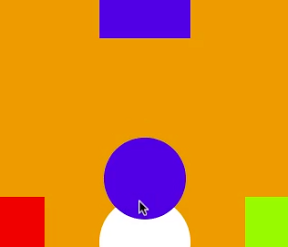

まんなかに出てくる色を、おなじ色のところにどんどんなげていこう!出てくる色は、あお、みずいろ、みどり、あかの四色だよ。 という風な色をくらべるiPhoneゲームの作り方を書いてみます。
動作イメージ
XcodeからiOS6 iPhone Simulatorで動かすとこんな感じになります。
ポイント
真ん中に4色からランダムにえらんだ色の円を表示して、それと同じいろの色見本に投げて行くゲームです。今回は4方向のUISwipeGestureRecognizerを背景のviewに設定しています。UIGestureRecognizerDelegateの中で、GestuerのtouchしたViewを真ん中の円かどうかを判定することで、円の上でスワイプするとその方向に円を飛ばせるようにしました。
サンプルコード
#import “ViewController.h”
#import <QuartzCore/QuartzCore.h>
#define UIColorHex(rgbValue) [UIColor colorWithRed:((float)((rgbValue & 0xFF0000) >> 16))/255.0 green:((float)((rgbValue & 0xFF00) >> 8))/255.0 blue:((float)(rgbValue & 0xFF))/255.0 alpha:1.0]
@interface ViewController () <UIGestureRecognizerDelegate> {
NSArray *colors;
NSMutableArray *goals;
NSTimer *timer;
UIView *selected;
}
@end
@implementation ViewController
– (void)viewDidLoad
{
[super viewDidLoad];
[self createColors];
self.view.backgroundColor = colors[0];
[self createGoals];
[self createCenter];
[self setupSwipe];
[self showColorBall];
}
– (void)createColors
{
colors = @[UIColorHex(0xE89700), UIColorHex(0x93FF00), UIColorHex(0xFF0000), UIColorHex(0x4508E8), UIColorHex(0x00F7FF)];
}
– (void)createGoals
{
float w = self.view.bounds.size.width;
float h = self.view.bounds.size.height;
CGPoint points[] = {CGPointMake(w, h/2.0), CGPointMake(0, h/2.0), CGPointMake(w/2.0, 0), CGPointMake(w/2.0, h)};
goals = [[NSMutableArray alloc] init];
for (int i=0; i<4; i++) {
UIView *goal = [[UIView alloc] initWithFrame:CGRectMake(0, 0, 100, 100)];
goal.backgroundColor = colors[i + 1];
goal.center = points[i];
[self.view addSubview:goal];
[goals addObject:goal];
}
}
– (void)createCenter
{
UIView *circle = [[UIView alloc] initWithFrame:CGRectMake(0, 0, 100, 100)];
circle.backgroundColor = [UIColor whiteColor];
circle.center = CGPointMake(self.view.bounds.size.width/2.0, self.view.bounds.size.height/2.0);
circle.layer.cornerRadius = 50;
[self.view addSubview:circle];
}
#define TagColorBall 1
– (void)showColorBall
{
UIView *ball = [[UIView alloc] initWithFrame:CGRectMake(0, 0, 90, 90)];
ball.layer.cornerRadius = 45;
ball.backgroundColor = colors[arc4random() % 4 + 1];
ball.center = CGPointMake(self.view.bounds.size.width/2.0, self.view.bounds.size.height/2.0);
ball.tag = TagColorBall; // color ball
[self.view addSubview:ball];
ball.transform = CGAffineTransformMakeScale(0.1, 0.1);
[UIView animateWithDuration:0.3 animations:^{
ball.transform = CGAffineTransformIdentity;
}];
}
– (void)setupSwipe
{
int directions[] = {
UISwipeGestureRecognizerDirectionRight,
UISwipeGestureRecognizerDirectionLeft,
UISwipeGestureRecognizerDirectionUp,
UISwipeGestureRecognizerDirectionDown
};
for (int i=0; i<4; i++) {
UISwipeGestureRecognizer *s = [[UISwipeGestureRecognizer alloc] initWithTarget:self action:@selector(throwBall:)];
s.direction = directions[i];
s.delegate = self;
[self.view addGestureRecognizer:s];
}
}
– (void)throwBall:(UISwipeGestureRecognizer*)gr
{
float w = self.view.bounds.size.width;
float h = self.view.bounds.size.height;
CGPoint p;
UIView *goal;
switch (gr.direction) {
case UISwipeGestureRecognizerDirectionRight:
p = CGPointMake(w, h/2.0);
goal = [goals objectAtIndex:0];
break;
case UISwipeGestureRecognizerDirectionLeft:
p = CGPointMake(0, h/2.0);
goal = [goals objectAtIndex:1];
break;
case UISwipeGestureRecognizerDirectionUp:
p = CGPointMake(w/2.0, 0);
goal = [goals objectAtIndex:2];
break;
case UISwipeGestureRecognizerDirectionDown:
p = CGPointMake(w/2.0, h);
goal = [goals objectAtIndex:3];
break;
default:
break;
}
[UIView animateWithDuration:0.5 animations:^{
selected.center = p;
} completion:^(BOOL finished) {
BOOL clear = NO;
if ([selected.backgroundColor isEqual:goal.backgroundColor]) {
clear = YES;
}
if (clear) {
[selected removeFromSuperview];
[self showColorBall];
} else {
[UIView animateWithDuration:0.5 animations:^{
selected.center = CGPointMake(w/2.0, h/2.0);
}];
}
}];
}
– (BOOL)gestureRecognizer:(UIGestureRecognizer *)gestureRecognizer shouldReceiveTouch:(UITouch *)touch
{
// こんな感じで真ん中の円からのスワイプだけ有効にする。
if (touch.view.tag == TagColorBall) {
selected = touch.view;
return YES;
}
return NO;
}
– (void)didReceiveMemoryWarning
{
[super didReceiveMemoryWarning];
// Dispose of any resources that can be recreated.
}
@end