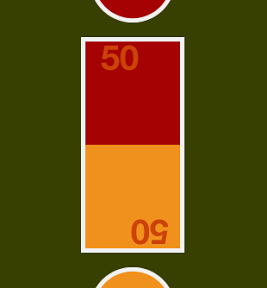

赤いボタンを押すと、帯グラフの赤い部分が増えます。黄色いボタンを押すと、帯グラフの黄色い部分が増えます。というシンプルなゲーム。二人で指をトントン、トントン、という感じで帯グラフiPhoneアプリの作成方法を書いてみます。
動作イメージ
XcodeからiOS6 iPhone Simulatorで動かすとこんな感じになります。
ポイント
帯グラフの枠として、UIViewを一つ真ん中に配置して、その中に、赤色と黄色のバーを入れこんでみました。赤はLayerのanchorPointを(0.5, 0)に設定、黄色は(0.5, 1.0)に設定。TapGestureを設定しておいてボタンが叩かれたら、バーのScaleを0 ~ 1.0 の間で調整することで赤と黄色の割合を調整しています。
サンプルコード
#import “ViewController.h”
#import <QuartzCore/QuartzCore.h>
#define UIColorHex(rgbValue) [UIColor colorWithRed:((float)((rgbValue & 0xFF0000) >> 16))/255.0 green:((float)((rgbValue & 0xFF00) >> 8))/255.0 blue:((float)(rgbValue & 0xFF))/255.0 alpha:1.0]
@interface ViewController () {
int barcounter; // min:0, max:100
UIView *bargraph;
UIView *redbar;
UIView *yellowbar;
UILabel *redText;
UILabel *yellowText;
}
@end
@implementation ViewController
– (void)viewDidLoad
{
[super viewDidLoad];
self.view.backgroundColor = [self colorTheme:0];
[self createBarGraph];
[self createButtons];
}
– (void)createBarGraph
{
barcounter = 50;
bargraph = [[UIView alloc] initWithFrame:CGRectMake(0, 0, 120, 250)];
bargraph.layer.borderColor = [self colorTheme:4].CGColor;
bargraph.layer.borderWidth = 5;
bargraph.center = self.view.center;
[self.view addSubview:bargraph];
redbar = [[UIView alloc] initWithFrame:CGRectMake(0, 0, 110, 240)];
redbar.backgroundColor = [self colorTheme:2];
redbar.layer.anchorPoint = CGPointMake(0.5, 0);
redbar.layer.position = CGPointMake(60, 5);
[bargraph addSubview:redbar];
redbar.transform = CGAffineTransformMakeScale(1.0, 0.5);
redText = [[UILabel alloc] initWithFrame:CGRectMake(5, 5, 80, 40)];
redText.text = @”50″;
redText.font = [UIFont boldSystemFontOfSize:40];
redText.textAlignment = 1;
redText.backgroundColor = [UIColor clearColor];
redText.textColor = [self colorTheme:3];
[bargraph addSubview:redText];
yellowbar = [[UIView alloc] initWithFrame:CGRectMake(0, 0, 110, 240)];
yellowbar.backgroundColor = [self colorTheme:1];
yellowbar.layer.anchorPoint = CGPointMake(0.5, 1.0);
yellowbar.layer.position = CGPointMake(60, 245);
[bargraph addSubview:yellowbar];
yellowbar.transform = CGAffineTransformMakeScale(1.0, 0.5);
yellowText = [[UILabel alloc] initWithFrame:CGRectMake(40, 205, 80, 40)];
yellowText.transform = CGAffineTransformMakeRotation(M_PI);
yellowText.text = @”50″;
yellowText.font = [UIFont boldSystemFontOfSize:40];
yellowText.textAlignment = 1;
yellowText.backgroundColor = [UIColor clearColor];
yellowText.textColor = [self colorTheme:3];
[bargraph addSubview:yellowText];
}
– (void)createButtons
{
UIView *top = [[UIView alloc] initWithFrame:CGRectMake(0, 0, 100, 100)];
top.layer.cornerRadius = 50;
top.layer.borderWidth = 5;
top.layer.borderColor = [self colorTheme:4].CGColor;
top.backgroundColor = [self colorTheme:2];
top.center = CGPointMake(self.view.bounds.size.width/2.0, self.view.bounds.size.height * 0.15);
[self.view addSubview:top];
UITapGestureRecognizer *tapA = [[UITapGestureRecognizer alloc] initWithTarget:self action:@selector(pushA:)];
[top addGestureRecognizer:tapA];
UIView *bottom = [[UIView alloc] initWithFrame:CGRectMake(0, 0, 100, 100)];
bottom.layer.cornerRadius = 50;
bottom.layer.borderWidth = 5;
bottom.layer.borderColor = [self colorTheme:4].CGColor;
bottom.backgroundColor = [self colorTheme:1];
bottom.center = CGPointMake(self.view.bounds.size.width/2.0, self.view.bounds.size.height * 0.85);
[self.view addSubview:bottom];
UITapGestureRecognizer *tapB = [[UITapGestureRecognizer alloc] initWithTarget:self action:@selector(pushB:)];
[bottom addGestureRecognizer:tapB];
}
– (void)pushA:(UITapGestureRecognizer*)gr
{
[self flash:gr.view];
if (barcounter < 100) {
barcounter++;
}
[self updateBarGraph];
}
– (void)pushB:(UITapGestureRecognizer*)gr
{
[self flash:gr.view];
if (barcounter > 0) {
barcounter–;
}
[self updateBarGraph];
}
– (void)flash:(UIView*)v
{
[UIView animateWithDuration:0.1 animations:^{
v.alpha = 0.7;
v.transform = CGAffineTransformMakeScale(1.1, 1.1);
} completion:^(BOOL finished) {
v.alpha = 1.0;
v.transform = CGAffineTransformIdentity;
}];
}
– (void)updateBarGraph
{
// update bar
redbar.transform = CGAffineTransformMakeScale(1.0, barcounter/100.0);
yellowbar.transform = CGAffineTransformMakeScale(1.0, (100 – barcounter)/100.0);
// update text
redText.text = [NSString stringWithFormat:@”%d”, barcounter];
yellowText.text = [NSString stringWithFormat:@”%d”, 100 – barcounter];
}
– (UIColor*)colorTheme:(int)n
{
switch (n) {
case 0:
return UIColorHex(0x384001);
case 1:
return UIColorHex(0xF2921D);
case 2:
return UIColorHex(0xA60303);
case 3:
return UIColorHex(0xCC4308);
case 4:
return UIColorHex(0xF2F2F2);
default:
return nil;
}
}
– (void)didReceiveMemoryWarning
{
[super didReceiveMemoryWarning];
// Dispose of any resources that can be recreated.
}
@end