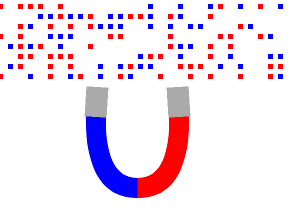

磁石で、赤と青の点をあつめて遊ぶiPhoneアプリを書いてみます。磁石の青い方の先端には赤い点がくっついて、磁石の赤い方の先端には青い点がくっつきます。
動作イメージ
XcodeからiOS6 iPhone Simulatorで動かすとこんな感じになります。
ポイント
UIPanGestureRecognizerを使う際に、触った部分を中心に移動させたいので、stateがbeginの時に磁石のanchorPointを変更して、移動はlayerのpositionで行いました。あと、磁石の先端部分に赤、青の点が触れたかどうかの判定を行っています。触れていたら、rootのviewから磁石のViewに点を移すことで、くっついたように見せてみました。
サンプルコード
#import “ViewController.h”
#import <QuartzCore/QuartzCore.h>
@interface ViewController () {
UIView *magnet;
UIView *redPoint;
UIView *bluePoint;
NSMutableArray *blueChips;
NSMutableArray *redChips;
}
@end
@implementation ViewController
– (void)viewDidLoad
{
[super viewDidLoad];
self.view.backgroundColor = [UIColor whiteColor];
[self createMagnet];
[self scatterChips];
[self createBtn];
}
– (void)createMagnet
{
magnet = [[UIView alloc] initWithFrame:CGRectMake(100, 400, 100, 100)];
[self.view addSubview:magnet];
// blue part
UIBezierPath *path = [UIBezierPath bezierPath];
[path moveToPoint:CGPointMake(10, 0)];
[path addQuadCurveToPoint:CGPointMake(50, 100) controlPoint:CGPointMake(0, 100)];
CAShapeLayer *sl = [[CAShapeLayer alloc] init];
sl.fillColor = [UIColor clearColor].CGColor;
sl.strokeColor = [UIColor blueColor].CGColor;
sl.lineWidth = 20;
sl.path = path.CGPath;
[magnet.layer addSublayer:sl];
// red part
path = [UIBezierPath bezierPath];
[path moveToPoint:CGPointMake(90, 0)];
[path addQuadCurveToPoint:CGPointMake(50, 100) controlPoint:CGPointMake(100, 100)];
sl = [[CAShapeLayer alloc] init];
sl.fillColor = [UIColor clearColor].CGColor;
sl.strokeColor = [UIColor redColor].CGColor;
sl.lineWidth = 20;
sl.path = path.CGPath;
[magnet.layer addSublayer:sl];
redPoint = [[UIView alloc] initWithFrame:CGRectMake(-2, –1, 22, 30)];
redPoint.backgroundColor = [UIColor lightGrayColor];
redPoint.transform = CGAffineTransformMakeRotation(M_PI * 0.02);
[magnet addSubview:redPoint];
bluePoint = [[UIView alloc] initWithFrame:CGRectMake(80, –1, 22, 30)];
bluePoint.backgroundColor = [UIColor lightGrayColor];
bluePoint.transform = CGAffineTransformMakeRotation(-M_PI * 0.02);
[magnet addSubview:bluePoint];
UIPanGestureRecognizer *pan = [[UIPanGestureRecognizer alloc] initWithTarget:self action:@selector(move:)];
[magnet addGestureRecognizer:pan];
}
– (void)scatterChips
{
redChips = [[NSMutableArray alloc] init];
blueChips = [[NSMutableArray alloc] init];
for (int i=0; i<900; i++) {
int type = arc4random() % 4; // 0 or 1: skip 2: red, 3: blue
float x = (i % 30) * 10 + 10;
float y = (i / 30) * 10 + 10;
switch (type) {
case 2:
{
UIView *red = [[UIView alloc] initWithFrame:CGRectMake(x, y, 5, 5)];
red.backgroundColor = [UIColor redColor];
[self.view addSubview:red];
[redChips addObject:red];
break;
}
case 3:
{
UIView *blue = [[UIView alloc] initWithFrame:CGRectMake(x, y, 5, 5)];
blue.backgroundColor = [UIColor blueColor];
[self.view addSubview:blue];
[blueChips addObject:blue];
break;
}
default:
break;
}
}
}
– (void)createBtn
{
UILabel *btn = [[UILabel alloc] initWithFrame:CGRectMake(220, 480, 80, 50)];
btn.text = @”reset”;
btn.textAlignment = NSTextAlignmentCenter;
btn.font = [UIFont systemFontOfSize:30];
btn.layer.borderColor = [UIColor blackColor].CGColor;
btn.layer.borderWidth = 1;
[self.view addSubview:btn];
btn.userInteractionEnabled = YES;
UITapGestureRecognizer *tap = [[UITapGestureRecognizer alloc] initWithTarget:self action:@selector(reset)];
[btn addGestureRecognizer:tap];
}
– (void)move:(UIPanGestureRecognizer*)gr
{
CGPoint p = [gr locationInView:self.view];
CGPoint local = [gr locationInView:gr.view];
if (gr.state == UIGestureRecognizerStateBegan) {
float x = local.x / gr.view.bounds.size.width;
float y = local.y / gr.view.bounds.size.height;
gr.view.layer.anchorPoint = CGPointMake(x, y);
}
[self check];
gr.view.layer.position = p;
}
– (void)check
{
CGRect redMag = [magnet convertRect:redPoint.frame toView:self.view];
for (UIView *v in redChips) {
if (CGRectIntersectsRect(redMag, v.frame)) {
v.frame = [magnet convertRect:v.frame fromView:self.view];
v.alpha = 0;
[self performSelector:@selector(connectMagnet:) withObject:v afterDelay:0];
}
}
CGRect blueMag = [magnet convertRect:bluePoint.frame toView:self.view];
for (UIView *v in blueChips) {
if (CGRectIntersectsRect(blueMag, v.frame)) {
v.frame = [magnet convertRect:v.frame fromView:self.view];
v.alpha = 0;
[self performSelector:@selector(connectMagnet:) withObject:v afterDelay:0];
}
}
}
– (void)connectMagnet:(UIView *)v
{
[UIView animateWithDuration:0.2 animations:^{
v.transform = CGAffineTransformMakeScale(2, 2);
} completion:^(BOOL finished) {
v.transform = CGAffineTransformIdentity;
}];
v.alpha = 1.0;
[magnet addSubview:v];
[redChips removeObject:v];
[blueChips removeObject:v];
}
– (void)reset
{
for (UIView *v in self.view.subviews) {
[v removeFromSuperview];
}
[self createMagnet];
[self scatterChips];
[self createBtn];
}
– (void)didReceiveMemoryWarning
{
[super didReceiveMemoryWarning];
// Dispose of any resources that can be recreated.
}
@end