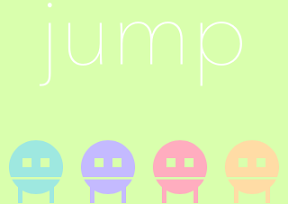

タッチすると口をあけながらジャンプする。四つ並んだカラフルなキャラクタージャンプさせて遊ぶシンプルなPhoneアプリを作っていきます。
動作イメージ
XcodeからiOS6 iPhone Simulatorで動かすとこんな感じになります。
ポイント
UIBezierPathのappendPathにて、bezierPathWithArcCenterを使った際に、clockwiseをNOにすると、なぜかfillRuleのEvenOddをYESにしたときのように、重なった部分を除いた描画になってしまったので、YESのみを使うようにしました。なんでだろう?
サンプルコード
#import “ViewController.h”
#import <QuartzCore/QuartzCore.h>
@interface ViewController ()
@end
@implementation ViewController
– (void)viewDidLoad
{
[super viewDidLoad];
self.view.backgroundColor = [self color:0];
// label
UILabel *l = [[UILabel alloc] init];
l.backgroundColor = [UIColor clearColor];
l.text = @”jump”;
l.font = [UIFont fontWithName:@”AvenirNext-UltraLight” size:100];
l.textAlignment = NSTextAlignmentCenter;
l.textColor = [UIColor whiteColor];
[l sizeToFit];
l.center = CGPointMake(160, 334);
[self.view addSubview:l];
// jumper
for (int i=0; i<4; i++) {
UIView *player = [self createPlayer:[self color:i+1]];
float x = i * (320.0 / 4.0) + (320.0 / 4.0 / 2.0);
player.center = CGPointMake(x, 480);
}
}
– (UIView*)createPlayer:(UIColor*)color
{
UIView *player = [[UIView alloc] initWithFrame:CGRectMake(10, 400, 60, 80)];
[self.view addSubview:player];
UIView *upper = [[UIView alloc] initWithFrame:CGRectMake(0, 0, 60, 80)];
upper.tag = 1;
UIBezierPath *upath = [UIBezierPath bezierPathWithArcCenter:CGPointMake(30, 40) radius:30 startAngle:M_PI * 0.88 endAngle:M_PI * 0.12 clockwise:YES];
[upath closePath];
[upath appendPath:[UIBezierPath bezierPathWithRect:CGRectMake(15, 30, 10, 10)]];
[upath appendPath:[UIBezierPath bezierPathWithRect:CGRectMake(35, 30, 10, 10)]];
CAShapeLayer *sl = [CAShapeLayer layer];
sl.fillColor = color.CGColor;
sl.path = upath.CGPath;
sl.fillRule = kCAFillRuleEvenOdd;
[upper.layer addSublayer:sl];
UIView *bottom = [[UIView alloc] initWithFrame:CGRectMake(0, 0, 60, 80)];
bottom.tag = 2;
UIBezierPath *bpath = [UIBezierPath bezierPathWithArcCenter:CGPointMake(30, 40) radius:30 startAngle:M_PI * 0.15 endAngle:M_PI * 0.85 clockwise:YES];
[bpath closePath];
[bpath appendPath:[UIBezierPath bezierPathWithRect:CGRectMake(10, 60, 5, 20)]];
[bpath appendPath:[UIBezierPath bezierPathWithRect:CGRectMake(45, 60, 5, 20)]];
CAShapeLayer *slb = [CAShapeLayer layer];
slb.fillColor = color.CGColor;
slb.path = bpath.CGPath;
[bottom.layer addSublayer:slb];
[player addSubview:upper];
[player addSubview:bottom];
UITapGestureRecognizer *tap = [[UITapGestureRecognizer alloc] initWithTarget:self action:@selector(jump:)];
[player addGestureRecognizer:tap];
return player;
}
– (void)jump:(UITapGestureRecognizer*)gr
{
UIView *top = [gr.view viewWithTag:1];
[UIView animateWithDuration:1.0 delay:0 options:UIViewAnimationOptionCurveEaseOut animations:^{
gr.view.transform = CGAffineTransformMakeTranslation(0, –300);
top.transform = CGAffineTransformMakeTranslation(0, –10);
} completion:^(BOOL finished) {
[UIView animateWithDuration:1.0 delay:0 options:UIViewAnimationOptionCurveEaseIn animations:^{
gr.view.transform = CGAffineTransformIdentity;
top.transform = CGAffineTransformIdentity;
} completion:^(BOOL finished) {
}];
}];
}
#define UIColorHex(rgbValue) [UIColor colorWithRed:((float)((rgbValue & 0xFF0000) >> 16))/255.0 green:((float)((rgbValue & 0xFF00) >> 8))/255.0 blue:((float)(rgbValue & 0xFF))/255.0 alpha:1.0]
– (UIColor*)color:(int)i
{
switch (i) {
case 0:
return UIColorHex(0xD9FFAD);
case 1:
return UIColorHex(0x9EE8E0);
case 2:
return UIColorHex(0xC4BAFF);
case 3:
return UIColorHex(0xFFADBF);
case 4:
return UIColorHex(0xFFDCA5);
default:
break;
}
return nil;
}
– (void)didReceiveMemoryWarning
{
[super didReceiveMemoryWarning];
// Dispose of any resources that can be recreated.
}
@end