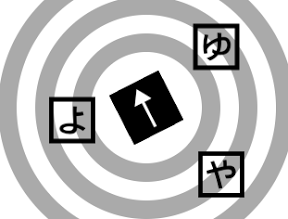

ひらがな「や」、「ゆ」、「よ」のカードが飛びだすようなiPhoneアプリを描いてみます。
動作イメージ
XcodeからiOS7 iPhone Simulatorで動かすとこんな感じになります。
サンプルコード
#import “ViewController.h”
#import <AVFoundation/AVFoundation.h>
@interface ViewController ()
@property (strong, nonatomic) UIButton *cardServer;
@property NSMutableArray *mySounds;
@end
@implementation ViewController
– (void)viewDidLoad
{
[super viewDidLoad];
[self createBackground];
[self createCardServer];
[self start];
[self prepareToSounds];
}
– (void)createBackground
{
for (int i=0; i<3; i++) {
float r = 40 * i + 80;
UIView *back = [[UIView alloc] initWithFrame:CGRectMake(0, 0, r * 2, r * 2)];
back.layer.cornerRadius = r;
back.layer.borderWidth = 20;
back.layer.borderColor = [UIColor lightGrayColor].CGColor;
back.center = CGPointMake(160, 240);
[self.view addSubview:back];
}
}
– (void)createCardServer
{
self.cardServer = [[UIButton alloc] initWithFrame:CGRectMake(0, 0, 60, 60)];
self.cardServer.center = CGPointMake(160, 240);
self.cardServer.backgroundColor = [UIColor blackColor];
[self.cardServer setTitle:@”→” forState:UIControlStateNormal];
self.cardServer.titleLabel.font = [UIFont systemFontOfSize:50];
self.cardServer.titleLabel.textAlignment = NSTextAlignmentCenter;
self.cardServer.titleLabel.textColor = [UIColor whiteColor];
[self.view addSubview:self.cardServer];
[self.cardServer addTarget:self action:@selector(serve) forControlEvents:UIControlEventTouchUpInside];
}
– (void)start
{
[NSTimer scheduledTimerWithTimeInterval:2.0/60.0 target:self selector:@selector(tick:) userInfo:nil repeats:YES];
}
– (void)serve
{
NSArray *words = @[@”や“,@”ゆ“,@”よ“];
UIButton *b = [UIButton buttonWithType:UIButtonTypeCustom];
b.frame = CGRectMake(0, 0, 50, 50);
b.center = self.cardServer.center;
b.titleLabel.font = [UIFont boldSystemFontOfSize:35];
[b setTitleColor:[UIColor blackColor] forState:UIControlStateNormal];
b.layer.borderColor = [UIColor blackColor].CGColor;
b.layer.borderWidth = 5;
[b setTitle:[words objectAtIndex:arc4random()%3] forState:UIControlStateNormal];
[self.view insertSubview:b belowSubview:self.cardServer];
float angle = [[self.cardServer.layer valueForKeyPath:@”transform.rotation.z”] floatValue];
float d = arc4random() % 30;
float x = d + b.center.x + 100 * cos(angle);
float y = d + b.center.y + 100 * sin(angle);
[UIView animateWithDuration:0.5 animations:^{
b.center = CGPointMake(x, y);
}];
[b addTarget:self action:@selector(play:) forControlEvents:UIControlEventTouchUpInside];
}
– (void)prepareToSounds
{
NSArray *names = @[@”ya”,@”yu”,@”yo”];
self.mySounds = [[NSMutableArray alloc] init];
for (NSString *s in names) {
NSURL* musicFile = [NSURL fileURLWithPath:[[NSBundle mainBundle] pathForResource:s ofType:@”m4a”]];
AVAudioPlayer *player = [[AVAudioPlayer alloc] initWithContentsOfURL:musicFile error:nil];
[player prepareToPlay];
[self.mySounds addObject:player];
}
}
– (void)play:(UIButton*)b
{
NSArray *kakiku = @[@”や“, @”ゆ“, @”よ“];
NSUInteger i = [kakiku indexOfObject:b.titleLabel.text];
[(AVAudioPlayer*)self.mySounds[i] play];
[UIView animateWithDuration:0.3 animations:^{
b.transform = CGAffineTransformMakeScale(0, 0);
} completion:^(BOOL finished) {
[b removeFromSuperview];
}];
}
– (void)tick:(NSTimer*)sender
{
self.cardServer.transform = CGAffineTransformRotate(self.cardServer.transform, M_PI * 0.01);
}
– (void)didReceiveMemoryWarning
{
[super didReceiveMemoryWarning];
// Dispose of any resources that can be recreated.
}
@end