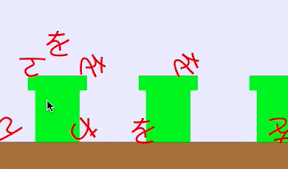

土管をたたくと、ひらがな「わをん」がとびだすようなiPhoneアプリを描いてみます。
動作イメージ
XcodeからiOS7 iPhone Simulatorで動かすとこんな感じになります。
サンプルコード
#import “ViewController.h”
#import <SpriteKit/SpriteKit.h>
#import <AVFoundation/AVFoundation.h>
@interface DokanScene : SKScene
@property BOOL contentCreated;
@property (strong, nonatomic) NSMutableArray *mySounds;
@end
@implementation DokanScene
– (void)didMoveToView:(SKView *)view
{
if (!self.contentCreated) {
[self createSceneContents];
[self prepareToSounds];
self.contentCreated = YES;
}
}
– (void)createSceneContents
{
self.backgroundColor = [SKColor colorWithRed:0.9 green:0.9 blue:1.0 alpha:1.0];
SKSpriteNode *ground = [[SKSpriteNode alloc] initWithColor:[SKColor brownColor] size:CGSizeMake(568, 40)];
ground.position = CGPointMake(284, 20);
ground.physicsBody = [SKPhysicsBody bodyWithRectangleOfSize:ground.size];
ground.physicsBody.dynamic = NO;
[self addChild:ground];
for (int i=0; i<3; i++) {
SKSpriteNode *dokan = [[SKSpriteNode alloc] initWithColor:[SKColor greenColor] size:CGSizeMake(60, 80)];
dokan.position = CGPointMake(150 * i + 80, 80);
dokan.name = @”dokan”;
[self addChild:dokan];
SKSpriteNode *dokanTop = [[SKSpriteNode alloc] initWithColor:[SKColor greenColor] size:CGSizeMake(80, 20)];
dokanTop.position = CGPointMake(150 * i + 80, 120);
[self addChild:dokanTop];
dokanTop.physicsBody = [SKPhysicsBody bodyWithRectangleOfSize:dokanTop.size];
dokanTop.physicsBody.dynamic = NO;
}
}
– (void)touchesBegan:(NSSet *)touches withEvent:(UIEvent *)event
{
CGPoint p = [[touches anyObject] locationInNode:self];
[self enumerateChildNodesWithName:@”dokan” usingBlock:^(SKNode *node, BOOL *stop) {
if ([node containsPoint:p]) {
[self createHiraganaNode:CGPointMake(node.position.x, node.position.y + 50)];
}
}];
}
– (void)createHiraganaNode:(CGPoint)p
{
NSArray *words = @[@”わ“, @”を“, @”ん“];
SKLabelNode *hiragana = [[SKLabelNode alloc] init];
hiragana.text = [words objectAtIndex:arc4random() % 3];
hiragana.fontColor = [UIColor redColor];
hiragana.horizontalAlignmentMode = SKLabelHorizontalAlignmentModeCenter;
hiragana.verticalAlignmentMode = SKLabelVerticalAlignmentModeCenter;
hiragana.fontSize = 40;
hiragana.physicsBody = [SKPhysicsBody bodyWithCircleOfRadius:15];
[self addChild:hiragana];
hiragana.position = p;
float x = 0.1 * (arc4random() % 10) – 0.5;
[hiragana.physicsBody applyImpulse: CGVectorMake(x, 15)];
[self play:hiragana.text];
[self performSelector:@selector(fade:) withObject:hiragana afterDelay:5.0];
}
– (void)fade:(SKNode*)node
{
SKAction *fadeout = [SKAction fadeOutWithDuration:2.0];
[node runAction:fadeout completion:^{
[node removeFromParent];
}];
}
– (void)prepareToSounds
{
NSArray *names = @[@”wa”,@”wo”,@”n”];
self.mySounds = [[NSMutableArray alloc] init];
for (NSString *s in names) {
NSURL* musicFile = [NSURL fileURLWithPath:[[NSBundle mainBundle] pathForResource:s ofType:@”m4a”]];
AVAudioPlayer *player = [[AVAudioPlayer alloc] initWithContentsOfURL:musicFile error:nil];
[player prepareToPlay];
[self.mySounds addObject:player];
}
}
– (void)play:(NSString*)s
{
NSArray *hiragana = @[@”わ“, @”を“, @”ん“];
NSUInteger i = [hiragana indexOfObject:s];
[(AVAudioPlayer*)self.mySounds[i] play];
}
@end
@interface ViewController ()
@end
@implementation ViewController
– (void)viewDidLoad
{
[super viewDidLoad];
SKView *spriteView = [[SKView alloc] initWithFrame:CGRectMake(0, 0, 568, 320)];
[self.view addSubview:spriteView];
DokanScene *scene = [[DokanScene alloc] initWithSize:CGSizeMake(568, 320)];
[spriteView presentScene:scene];
}
– (void)didReceiveMemoryWarning
{
[super didReceiveMemoryWarning];
// Dispose of any resources that can be recreated.
}
@end