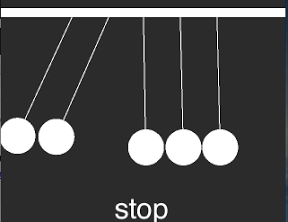

ニュートンのゆりかごみたいなカチカチ球をぶつけるiPhoneアプリのサンプルを描いてみます。
動作イメージ
XcodeからiOS7 iPhone Simulatorで動かすとこんな感じになります。
サンプルコード
#import “ViewController.h”
#import <SpriteKit/SpriteKit.h>
@interface CradleScene : SKScene
@property BOOL contentCreated;
@end
@implementation CradleScene
– (void)didMoveToView:(SKView *)view
{
if (!self.contentCreated) {
[self createSceneContents];
self.contentCreated = YES;
}
}
– (void)createSceneContents
{
SKSpriteNode *bar = [SKSpriteNode spriteNodeWithColor:[SKColor whiteColor] size:CGSizeMake(320, 10)];
bar.position = CGPointMake(160, 250);
[self addChild:bar];
bar.physicsBody = [SKPhysicsBody bodyWithRectangleOfSize:bar.size];
bar.physicsBody.dynamic = NO;
UIBezierPath *path = [UIBezierPath bezierPathWithOvalInRect:CGRectMake(-20, –20, 40, 40)];
for (int i=0; i<5; i++) {
SKShapeNode *ball = [SKShapeNode node];
ball.name = @”ball”;
ball.path = path.CGPath;
ball.fillColor = [SKColor whiteColor];
ball.strokeColor = [SKColor clearColor];
ball.position = CGPointMake(41 * i + 80, 100);
[self addChild:ball];
ball.physicsBody = [SKPhysicsBody bodyWithCircleOfRadius:20];
ball.physicsBody.restitution = 1.0;
SKSpriteNode *wire = [SKSpriteNode spriteNodeWithColor:[SKColor whiteColor] size:CGSizeMake(1, 130)];
wire.position = CGPointMake(ball.position.x, 185);
[self addChild:wire];
wire.physicsBody = [SKPhysicsBody bodyWithRectangleOfSize:wire.size];
wire.physicsBody.affectedByGravity = NO;
SKPhysicsJointPin *top = [SKPhysicsJointPin jointWithBodyA:bar.physicsBody bodyB:wire.physicsBody anchor:CGPointMake(wire.position.x, 240)];
[self.physicsWorld addJoint:top];
SKPhysicsJointPin *ballAndWire = [SKPhysicsJointPin jointWithBodyA:wire.physicsBody bodyB:ball.physicsBody anchor:CGPointMake(wire.position.x, 130)];
ballAndWire.frictionTorque = 1.0;
[self.physicsWorld addJoint:ballAndWire];
}
SKLabelNode *stop = [SKLabelNode node];
stop.text = @”stop”;
stop.name = @”stop”;
stop.position = CGPointMake(160, 20);
[self addChild:stop];
}
– (void)reset
{
[self enumerateChildNodesWithName:@”ball” usingBlock:^(SKNode *node, BOOL *stop) {
node.physicsBody.velocity = CGVectorMake(0, 0);
}];
}
– (void)touchesBegan:(NSSet *)touches withEvent:(UIEvent *)event
{
CGPoint p = [[touches anyObject] locationInNode:self];
[self enumerateChildNodesWithName:@”ball” usingBlock:^(SKNode *node, BOOL *stop) {
if ([node containsPoint:p]) {
float dx = 20;
if (p.x < 160) {
dx = -dx;
}
[node.physicsBody applyImpulse:CGVectorMake(dx, 0)];
}
}];
SKNode *stop = [self childNodeWithName:@”stop”];
if ([stop containsPoint:p]) {
[self reset];
}
}
@end
@interface ViewController ()
@end
@implementation ViewController
– (void)viewDidLoad
{
[super viewDidLoad];
SKView *spriteView = [[SKView alloc] initWithFrame:self.view.bounds];
[self.view addSubview:spriteView];
SKScene *scene = [[CradleScene alloc] initWithSize:spriteView.bounds.size];
[spriteView presentScene:scene];
}
– (void)didReceiveMemoryWarning
{
[super didReceiveMemoryWarning];
// Dispose of any resources that can be recreated.
}
@end