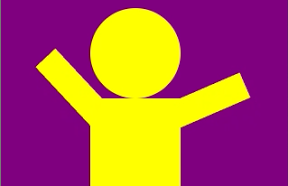

ひっぱると手を上にあげる。それだけのからくり人形風iPhoneアプリのサンプルコードを描いてみます。
動かすとこんな感じです
サンプルコード
#import “ViewController.h”
@interface ViewController ()
@property (nonatomic, weak) UIView *body;
@property (nonatomic, weak) UIView *handA;
@property (nonatomic, weak) UIView *handB;
@property (nonatomic, weak) UIView *handle;
@property (nonatomic, strong) UIDynamicAnimator *animator;
@property (nonatomic, strong) UIAttachmentBehavior *attachmentBehavior;
@property (nonatomic, strong) UISnapBehavior *snapBehavior;
@end
@implementation ViewController
– (void)viewDidLoad
{
[super viewDidLoad];
self.view.backgroundColor = [UIColor purpleColor];
UIView *bodyView = [[UIView alloc] initWithFrame:CGRectMake(100, 250, 100, 100)];
bodyView.backgroundColor = [UIColor yellowColor];
[self.view addSubview:bodyView];
self.body = bodyView;
CALayer *head = [CALayer layer];
head.frame = CGRectMake(0, –100, 100, 100);
head.backgroundColor = [UIColor yellowColor].CGColor;
head.cornerRadius = 50;
[self.body.layer addSublayer:head];
UIView *handView = [[UIView alloc] initWithFrame:CGRectMake(30, 250, 100, 30)];
handView.backgroundColor = [UIColor yellowColor];
[self.view addSubview:handView];
self.handA = handView;
handView = [[UIView alloc] initWithFrame:CGRectMake(190, 250, 100, 30)];
handView.backgroundColor = [UIColor yellowColor];
[self.view addSubview:handView];
self.handB = handView;
UIDynamicAnimator *animator = [[UIDynamicAnimator alloc] initWithReferenceView:self.view];
// body is strong
UIDynamicItemBehavior *behavior = [[UIDynamicItemBehavior alloc] initWithItems:@[self.body]];
behavior.allowsRotation = NO;
behavior.density = 1000000;
behavior.friction = 1000000000;
[animator addBehavior:behavior];
// hand and body
UIAttachmentBehavior *attachmentBehavior = [[UIAttachmentBehavior alloc] initWithItem:self.body offsetFromCenter:UIOffsetMake(-40, –40) attachedToItem:self.handA offsetFromCenter:UIOffsetMake(40, 0)];
attachmentBehavior.damping = 1000;
[animator addBehavior:attachmentBehavior];
UIAttachmentBehavior *attachmentBehaviorB = [[UIAttachmentBehavior alloc] initWithItem:self.body offsetFromCenter:UIOffsetMake(40, –40) attachedToItem:self.handB offsetFromCenter:UIOffsetMake(-40, 0)];
attachmentBehaviorB.damping = 1000;
[animator addBehavior:attachmentBehaviorB];
UIGravityBehavior *gravity = [[UIGravityBehavior alloc]initWithItems:@[self.handA, self.handB]];
[animator addBehavior:gravity];
// hand and handle
UIView *handle = [[UIView alloc] initWithFrame:CGRectMake(0, 0, 50, 50)];
handle.layer.cornerRadius = 25;
handle.center = CGPointMake(160, 400);
handle.layer.borderColor = [UIColor grayColor].CGColor;
handle.layer.borderWidth = 15;
[self.view addSubview:handle];
self.handle = handle;
UIAttachmentBehavior *attachmentBehaviorC = [[UIAttachmentBehavior alloc] initWithItem:self.handle offsetFromCenter:UIOffsetMake(0, 0) attachedToItem:self.handA offsetFromCenter:UIOffsetMake(50, 0)];
attachmentBehaviorC.frequency = 4.0;
attachmentBehaviorC.damping = 0.5;
[animator addBehavior:attachmentBehaviorC];
UIAttachmentBehavior *attachmentBehaviorD = [[UIAttachmentBehavior alloc] initWithItem:self.handle offsetFromCenter:UIOffsetMake(0, 0) attachedToItem:self.handB offsetFromCenter:UIOffsetMake(-50, 0)];
attachmentBehaviorD.frequency = 4.0;
attachmentBehaviorD.damping = 0.5;
[animator addBehavior:attachmentBehaviorD];
self.attachmentBehavior = attachmentBehavior;
self.animator = animator;
UIPanGestureRecognizer *pan = [[UIPanGestureRecognizer alloc] initWithTarget:self action:@selector(handleGesture:)];
[self.view addGestureRecognizer:pan];
}
– (void)handleGesture:(UIPanGestureRecognizer*)gesture
{
CGPoint p = [gesture locationInView:self.view];
[self.animator removeBehavior:self.snapBehavior];
self.snapBehavior = [[UISnapBehavior alloc]initWithItem:self.handle snapToPoint:p];
[_animator addBehavior:self.snapBehavior];
}
– (void)didReceiveMemoryWarning
{
[super didReceiveMemoryWarning];
// Dispose of any resources that can be recreated.
}
@end