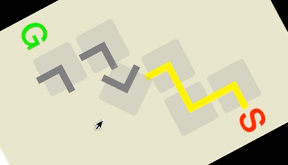

パイプラインを繋いであそぶiPhoneアプリのサンプルコードを描いてみます。
動かすとこんな感じです
サンプルコード
#import “ViewController.h”
@interface ViewController ()
@end
@implementation ViewController
– (void)viewDidLoad
{
[super viewDidLoad];
self.view.backgroundColor = [UIColor colorWithRed:0.9 green:0.9 blue:0.8 alpha:1];
[self createStartGoal];
[self createPipes];
}
– (void)createStartGoal
{
UILabel *start = [[UILabel alloc] initWithFrame:CGRectMake(0, 0, 50, 50)];
start.text = @”S”;
start.font = [[UIFont preferredFontForTextStyle:UIFontTextStyleHeadline] fontWithSize:50];
start.textColor = [UIColor redColor];
start.center = CGPointMake(300, 130);
[self.view addSubview:start];
UILabel *end = [[UILabel alloc] initWithFrame:CGRectMake(0, 0, 50, 50)];
end.text = @”G”;
end.font = [[UIFont preferredFontForTextStyle:UIFontTextStyleHeadline] fontWithSize:50];
end.textColor = [UIColor greenColor];
end.center = CGPointMake(40, 350);
[self.view addSubview:end];
}
– (void)createPipes
{
int8_t p[] = {
0, 0, 1,
0, 3, 2,
5, 4, 0,
6, 0, 0,
};
for (int i=0; i<sizeof(p)/sizeof(int8_t); i++) {
if (p[i] > 0) {
float x = (i % 3) * 70 + 95;
float y = (i / 3) * 70 + 130;
UIView *pipe = [self createPipe];
pipe.center = CGPointMake(x, y);
pipe.tag = p[i];
if (p[i] == 1) {
[pipe.layer.sublayers enumerateObjectsUsingBlock:^(CALayer *obj, NSUInteger idx, BOOL *stop) {
[obj setBackgroundColor:[UIColor yellowColor].CGColor];
}];
}
[self.view addSubview:pipe];
}
}
}
– (UIView *)createPipe
{
UIView *pipe = [[UIView alloc] initWithFrame:CGRectMake(0, 0, 60, 60)];
pipe.backgroundColor = [[UIColor lightGrayColor] colorWithAlphaComponent:0.3];
pipe.layer.cornerRadius = 5;
for (int i=0; i<2; i++) {
CALayer *l = [CALayer layer];
l.backgroundColor = [UIColor grayColor].CGColor;
l.frame = i ? CGRectMake(25, 25, 42, 10) : CGRectMake(25, 25, 10, 42);
[pipe.layer addSublayer:l];
}
UITapGestureRecognizer *tap = [[UITapGestureRecognizer alloc] initWithTarget:self action:@selector(turn:)];
[pipe addGestureRecognizer:tap];
return pipe;
}
– (void)turn:(UITapGestureRecognizer *)tap
{
[UIView animateWithDuration:0.5 animations:^{
tap.view.transform = CGAffineTransformRotate(tap.view.transform, M_PI/2.0);
} completion:^(BOOL finished) {
for (int i=2; i<=6; i++) {
BOOL yellow = NO;
UIView *target = [self.view viewWithTag:i];
UIView *pre = [self.view viewWithTag:target.tag – 1];
for (int j=0; j<4; j++) {
CALayer *l1 = target.layer.sublayers[j%2];
CALayer *l2 = pre.layer.sublayers[j/2];
CGRect r1 = [self.view convertRect:l1.frame fromView:target];
CGRect r2 = [self.view convertRect:l2.frame fromView:pre];
if (CGRectIntersectsRect(r1, r2) && CGColorEqualToColor(l2.backgroundColor, [UIColor yellowColor].CGColor)) {
yellow = YES;
}
}
[target.layer.sublayers enumerateObjectsUsingBlock:^(CALayer *l, NSUInteger idx, BOOL *stop) {
l.backgroundColor = yellow ? [UIColor yellowColor].CGColor : [UIColor grayColor].CGColor;
}];
}
}];
}
@end