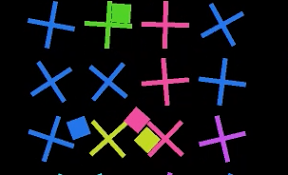

上から色付きブロックをおとして、羽を回すようなiPhoneアプリのサンプルコードを描いてみます。
#import “ViewController.h”
#import <SpriteKit/SpriteKit.h>
@interface PinWheel : SKScene <SKPhysicsContactDelegate>
@end
@implementation PinWheel
– (void)didMoveToView:(SKView *)view
{
self.backgroundColor = [SKColor blackColor];
self.physicsWorld.contactDelegate = self;
[self createWall];
[self createPinwheel];
[self createButton];
}
– (void)createWall
{
self.physicsBody = [SKPhysicsBody bodyWithEdgeLoopFromRect:self.frame];
self.physicsBody.dynamic = NO;
}
– (void)createPinwheel
{
for (int i=0; i<20; i++) {
float x = (i % 4) * 60 + 70;
float y = (i / 4) * 60 + 80;
SKNode *pinwheel = [SKNode node];
pinwheel.name = @”pinwheel”;
NSMutableArray *bodies = [NSMutableArray array];
for (int j=0; j<2; j++) {
float w = j ? 50 : 5;
float h = j ? 5 : 50;
SKSpriteNode *bar = [SKSpriteNode spriteNodeWithColor:[SKColor whiteColor] size:CGSizeMake(w, h)];
[bodies addObject:[SKPhysicsBody bodyWithRectangleOfSize:bar.size]];
[pinwheel addChild:bar];
}
pinwheel.position = CGPointMake(x, y);
[self addChild:pinwheel];
pinwheel.physicsBody = [SKPhysicsBody bodyWithBodies:bodies];
pinwheel.physicsBody.categoryBitMask = 0x1 << 1;
pinwheel.physicsBody.contactTestBitMask = 0x1 << 2;
SKPhysicsJointPin *pin = [SKPhysicsJointPin jointWithBodyA:pinwheel.physicsBody bodyB:self.physicsBody anchor:pinwheel.position];
[self.physicsWorld addJoint:pin];
}
}
– (void)createButton
{
UIBezierPath *path = [UIBezierPath bezierPath];
[path moveToPoint:CGPointMake(0, –30)];
[path addLineToPoint:CGPointMake(-20, –20)];
[path addLineToPoint:CGPointMake(-20, 20)];
[path addLineToPoint:CGPointMake(20, 20)];
[path addLineToPoint:CGPointMake(20, –20)];
[path closePath];
SKShapeNode *btn = [SKShapeNode node];
btn.name = @”btn”;
btn.path = path.CGPath;
btn.position = CGPointMake(160, CGRectGetMaxY(self.frame) – 50);
[self addChild:btn];
[btn runAction:[SKAction repeatActionForever:[SKAction sequence:@[[SKAction moveToX:20 duration:2.0], [SKAction moveToX:300 duration:2.0]]]]];
}
– (void)touchesBegan:(NSSet *)touches withEvent:(UIEvent *)event
{
SKNode *btn = [self childNodeWithName:@”btn”];
[self createDrop:btn.position];
}
– (void)createDrop:(CGPoint)p
{
float hue = (arc4random() % 10) * 0.1;
SKSpriteNode *drop = [SKSpriteNode spriteNodeWithColor:[SKColor colorWithHue:hue saturation:0.8 brightness:0.9 alpha:1.0] size:CGSizeMake(20, 20)];
[self addChild:drop];
drop.physicsBody = [SKPhysicsBody bodyWithRectangleOfSize:drop.size];
drop.physicsBody.categoryBitMask = 0x1 << 2;
drop.position = p;
}
– (void)didEndContact:(SKPhysicsContact *)contact
{
[contact.bodyA.node.children enumerateObjectsUsingBlock:^(id obj, NSUInteger idx, BOOL *stop) {
[obj setColor:[(SKSpriteNode *)contact.bodyB.node color]];
}];
}
@end
@interface ViewController ()
@end
@implementation ViewController
– (void)viewDidLoad
{
[super viewDidLoad];
SKView *spriteView = [[SKView alloc] initWithFrame:self.view.bounds];
[self.view addSubview:spriteView];
SKScene *scene = [[PinWheel alloc] initWithSize:spriteView.frame.size];
[spriteView presentScene:scene];
}
– (void)didReceiveMemoryWarning
{
[super didReceiveMemoryWarning];
// Dispose of any resources that can be recreated.
}
@end