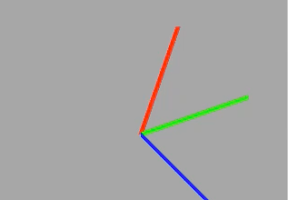

OpenGLを使って、xyzの軸を表示するiPhoneアプリのサンプルコードを描いてみます。
#import <GLKit/GLKit.h>
@interface ViewController : GLKViewController
@end
#import “ViewController.h”
@interface ViewController () {
GLuint v;
}
@property (nonatomic, strong) GLKBaseEffect *baseEffect;
@property (nonatomic, weak) GLKView *gv;
@end
@implementation ViewController
– (void)loadView
{
self.view = [[GLKView alloc] initWithFrame:[[UIScreen mainScreen] bounds] context:[[EAGLContext alloc] initWithAPI:kEAGLRenderingAPIOpenGLES2]];
}
– (void)viewDidLoad
{
[super viewDidLoad];
self.gv = (GLKView *)self.view;
self.gv.drawableColorFormat = GLKViewDrawableDepthFormat16;
self.baseEffect = [[GLKBaseEffect alloc] init];
// Let’s color the line
self.baseEffect.useConstantColor = GL_TRUE;
// Make the line a cyan color
self.baseEffect.constantColor = GLKVector4Make(0.0f, 1.0f, 1.0f, 1.0f);
}
– (void)glkView:(GLKView *)view drawInRect:(CGRect)rect
{
glClearColor(0.65f, 0.65f, 0.65f, 1.0f);
glClear(GL_COLOR_BUFFER_BIT | GL_DEPTH_BUFFER_BIT);
[self.baseEffect prepareToDraw];
typedef struct
{
float Position[3];
float Color[4];
} Vertex;
const Vertex vertices[] = {
{{0, 0, 0}, {1,0,0,1}},
{{1, 0, 0}, {1,0,0,1}},
{{0, 0, 0}, {0,1,0,1}},
{{0, 1, 0}, {0,1,0,1}},
{{0, 0, 0}, {0,0,1,1}},
{{0, 0, 1}, {0,0,1,1}},
};
glGenBuffers(1, &v);
glBindBuffer(GL_ARRAY_BUFFER, v);
glBufferData(GL_ARRAY_BUFFER, sizeof(vertices), vertices, GL_STATIC_DRAW);
glBindBuffer(GL_ARRAY_BUFFER, v);
glEnableVertexAttribArray(GLKVertexAttribPosition);
glVertexAttribPointer(GLKVertexAttribPosition, 3, GL_FLOAT, GL_FALSE, sizeof(Vertex), NULL + 0);
glEnableVertexAttribArray(GLKVertexAttribColor);
glVertexAttribPointer(GLKVertexAttribColor, 4, GL_FLOAT, GL_FALSE, sizeof(Vertex), NULL + offsetof(Vertex, Color));
glDrawArrays(GL_LINES, 0, 2);
glDrawArrays(GL_LINES, 2, 2);
glDrawArrays(GL_LINES, 4, 2);
glLineWidth(10.0);
const GLfloat aspectRatio = (GLfloat)view.drawableWidth / (GLfloat)view.drawableHeight;
self.baseEffect.transform.projectionMatrix = GLKMatrix4MakeScale(1, 1 * aspectRatio, 1);
GLKMatrix4 mat = self.baseEffect.transform.modelviewMatrix;
mat = GLKMatrix4Rotate(mat, GLKMathDegreesToRadians(1), 1, 1, 0);
self.baseEffect.transform.modelviewMatrix = mat;
}
– (void)didReceiveMemoryWarning
{
[super didReceiveMemoryWarning];
// Dispose of any resources that can be recreated.
}
@end