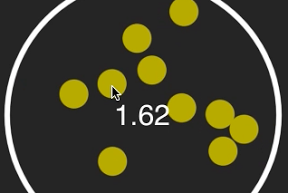

丸の中をはね返るディスクをタップで消していくiPhoneアプリのサンプルコードを描いてみます。
#import “ViewController.h”
#import <SpriteKit/SpriteKit.h>
@interface DiskScene : SKScene
@property NSTimeInterval startTime;
@property int state;
@end
@implementation DiskScene
– (void)didMoveToView:(SKView *)view
{
[self createRing];
[self createDisks];
[self createButton];
}
– (void)createRing
{
self.physicsWorld.gravity = CGVectorMake(0, 0);
UIBezierPath *path = [UIBezierPath bezierPathWithArcCenter:CGPointZero radius:150 startAngle:0 endAngle:2.0*M_PI clockwise:NO];
SKShapeNode *ring = [SKShapeNode node];
ring.path = path.CGPath;
ring.lineWidth = 5;
ring.position = CGPointMake(CGRectGetMidX(self.frame), 250);
ring.physicsBody = [SKPhysicsBody bodyWithEdgeChainFromPath:path.CGPath];
ring.physicsBody.dynamic = NO;
[self addChild:ring];
}
– (void)createDisks
{
UIBezierPath *path = [UIBezierPath bezierPathWithArcCenter:CGPointZero radius:15 startAngle:0 endAngle:2.0*M_PI clockwise:NO];
int count = 10;
float angle = 2.0 * M_PI / count;
for (int i=0; i<10; i++) {
float x = 120 * cos(angle * i) + 160;
float y = 120 * sin(angle * i) + 250;
SKShapeNode *disk = [SKShapeNode node];
disk.name = @”disk”;
disk.position = CGPointMake(x, y);
disk.path = path.CGPath;
disk.fillColor = [SKColor colorWithRed:0.7 green:0.7 blue:0 alpha:1.0];
disk.strokeColor = [SKColor colorWithRed:0.7 green:0.7 blue:0 alpha:1.0];
disk.physicsBody = [SKPhysicsBody bodyWithCircleOfRadius:15];
disk.physicsBody.restitution = 1.0;
disk.physicsBody.linearDamping = 0;
[self addChild:disk];
}
}
– (void)createButton
{
SKLabelNode *startButton = [SKLabelNode node];
startButton.name = @”start button”;
startButton.text = @”START”;
startButton.verticalAlignmentMode = SKLabelVerticalAlignmentModeCenter;
startButton.horizontalAlignmentMode = SKLabelHorizontalAlignmentModeCenter;
startButton.position = CGPointMake(160, 250);
[self addChild:startButton];
}
– (void)touchesBegan:(NSSet *)touches withEvent:(UIEvent *)event
{
CGPoint p = [[touches anyObject] locationInNode:self];
SKNode *startButton = [self childNodeWithName:@”start button”];
if ([startButton containsPoint:p]) {
startButton.name = @”message”;
[self start];
return;
}
[self enumerateChildNodesWithName:@”disk” usingBlock:^(SKNode *node, BOOL *stop) {
if([node containsPoint:p]) {
[node runAction:[SKAction fadeOutWithDuration:0.5] completion:^{
[node removeFromParent];
}];
}
}];
}
– (void)start
{
[self enumerateChildNodesWithName:@”disk” usingBlock:^(SKNode *node, BOOL *stop) {
node.physicsBody.velocity = CGVectorMake(arc4random() % 500, arc4random() % 500);
}];
self.state = 1;
}
– (void)update:(NSTimeInterval)currentTime
{
if (self.state == 1) {
self.state = 2;
self.startTime = currentTime;
}
SKLabelNode *message = (SKLabelNode *)[self childNodeWithName:@”message”];
SKNode *disk = [self childNodeWithName:@”disk”];
if (!disk && self.state == 2) {
self.state = 3;
// clear
message.text = [NSString stringWithFormat:@”%@ %@”,message.text, @”Clear!”];
} else if (self.state == 2) {
message.text = [NSString stringWithFormat:@”%.2f”, currentTime – self.startTime];
}
}
@end
@interface ViewController ()
@end
@implementation ViewController
– (void)viewDidLoad
{
[super viewDidLoad];
SKView *spriteView = [[SKView alloc] initWithFrame:self.view.bounds];
[self.view addSubview:spriteView];
SKScene *scene = [[DiskScene alloc] initWithSize:spriteView.frame.size];
[spriteView presentScene:scene];
}
@end