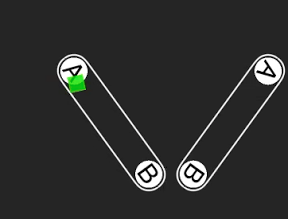

A, Bのところにくると、四角の位置が瞬間移動。というiPhoneアプリのサンプルコードを描いてみます。
#import “ViewController.h”
#import <SpriteKit/SpriteKit.h>
@interface HoleScene : SKScene
@end
@implementation HoleScene
– (void)didMoveToView:(SKView *)view
{
self.physicsWorld.speed = 0.3;
[self createLines];
[self createBall];
}
– (void)createLines
{
SKNode *barOne = [self createBar];
barOne.position = CGPointMake(160, 200);
barOne.zRotation = M_PI * 0.2;
SKNode *barTwo = [self createBar];
barTwo.position = CGPointMake(160, 350);
barTwo.zRotation = –M_PI * 0.2;
}
– (SKNode *)createBar
{
UIBezierPath *path = [UIBezierPath bezierPathWithRoundedRect:CGRectMake(-100, –20, 200, 40) cornerRadius:20];
SKShapeNode *bar = [SKShapeNode node];
bar.name = @”bar”;
bar.path = path.CGPath;
[self addChild:bar];
UIBezierPath *holePath = [UIBezierPath bezierPathWithArcCenter:CGPointZero radius:17 startAngle:0 endAngle:2.0*M_PI clockwise:NO];
for (int i=0; i<2; i++) {
SKShapeNode *hole = [SKShapeNode node];
hole.position = CGPointMake(-80 + 160 * i, 0);
hole.path = holePath.CGPath;
hole.lineWidth = 0;
hole.fillColor = [SKColor whiteColor];
[bar addChild:hole];
SKLabelNode *a = [SKLabelNode node];
a.name = @”hole”;
a.text = i == 0 ? @”A” : @”B”;
a.fontColor = [SKColor blackColor];
a.position = CGPointMake(-80 + 160 * i, 0);
a.verticalAlignmentMode = SKLabelVerticalAlignmentModeCenter;
[bar addChild:a];
}
bar.physicsBody = [SKPhysicsBody bodyWithEdgeLoopFromPath:path.CGPath];
return bar;
}
– (void)createBall
{
SKColor *color = [[SKColor greenColor] colorWithAlphaComponent:0.8];
SKSpriteNode *ball = [SKSpriteNode spriteNodeWithColor:color size:CGSizeMake(20, 20)];
ball.name = @”ball”;
ball.physicsBody = [SKPhysicsBody bodyWithCircleOfRadius:12];
ball.position = CGPointMake(160, 200);
[self addChild:ball];
}
– (void)didSimulatePhysics
{
SKNode *ball = [self childNodeWithName:@”ball”];
[self enumerateChildNodesWithName:@”bar” usingBlock:^(SKNode *bar, BOOL *stop) {
[bar enumerateChildNodesWithName:@”hole” usingBlock:^(SKNode *node, BOOL *stop) {
CGPoint holeCenter = [node.parent convertPoint:node.position toNode:self];
if ([ball containsPoint:holeCenter]) {
[self holeIn:(SKLabelNode *)node];
}
}];
}];
}
– (void)holeIn:(SKLabelNode *)hole
{
SKNode *ball = [self childNodeWithName:@”ball”];
[self enumerateChildNodesWithName:@”bar” usingBlock:^(SKNode *node, BOOL *stop) {
if (hole.parent != node) {
SKLabelNode *next = nil;
for (SKLabelNode *l in node.children) {
if ([l isKindOfClass:[SKLabelNode class]] && [l.text isEqual:hole.text]) {
next = l;
}
}
ball.physicsBody = nil;
ball.name = @”ball animation”;
CGPoint nextPoint = [next.parent convertPoint:next.position toNode:self];
SKAction *action1 = [SKAction fadeAlphaTo:0.1 duration:0.5];
SKAction *action2 = [SKAction moveTo:nextPoint duration:0.2];
SKAction *action3 = [SKAction fadeInWithDuration:0.5];
SKAction *action4 = [SKAction customActionWithDuration:0.1 actionBlock:^(SKNode *node, CGFloat elapsedTime) {
ball.physicsBody = [SKPhysicsBody bodyWithCircleOfRadius:12];
}];
SKAction *action5 = [SKAction customActionWithDuration:0 actionBlock:^(SKNode *node, CGFloat elapsedTime) {
ball.name = @”ball”;
}];
[ball runAction:[SKAction sequence:@[action1, action2, action3, action4, [SKAction waitForDuration:1.5], action5]]];
}
}];
}
@end
@interface ViewController ()
@end
@implementation ViewController
– (void)viewDidLoad
{
[super viewDidLoad];
SKView *spriteView = [[SKView alloc] initWithFrame:self.view.bounds];
[self.view addSubview:spriteView];
SKScene *scene = [[HoleScene alloc] initWithSize:spriteView.frame.size];
[spriteView presentScene:scene];
}
@end