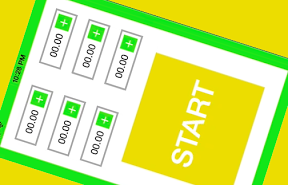

6個のタイマーを表示するiPhoneアプリのサンプルコードを描いてみます。
#import “ViewController.h”
@interface TimerView : UIView
@property (nonatomic) NSTimeInterval interval;
@property (nonatomic, weak) UILabel *timeLabel;
– (void)start;
@end
@implementation TimerView
– (id)initWithFrame:(CGRect)frame
{
self = [super initWithFrame:frame];
if (self) {
UILabel *label = [[UILabel alloc] initWithFrame:CGRectMake(0, 0, CGRectGetMaxX(self.bounds) – 40, CGRectGetMaxY(self.bounds))];
label.text = @”00.00″;
label.textAlignment = NSTextAlignmentRight;
[self addSubview:label];
self.timeLabel = label;
UIButton *btn = [UIButton buttonWithType:UIButtonTypeCustom];
btn.frame = CGRectMake(0, 0, 25, 25);
[btn setTitle:@”+“ forState:UIControlStateNormal];
btn.titleLabel.font = [UIFont boldSystemFontOfSize:25];
btn.center = CGPointMake(CGRectGetMaxX(self.bounds) – 20, CGRectGetMidY(self.bounds));
btn.backgroundColor = [UIColor greenColor];
[btn setTitleColor:[UIColor greenColor] forState:UIControlStateHighlighted];
[self addSubview:btn];
[btn addTarget:self action:@selector(countup) forControlEvents:UIControlEventTouchUpInside];
}
return self;
}
– (void)countup
{
self.interval = self.interval + 1;
self.timeLabel.text = [NSString stringWithFormat:@”%.2f”, self.interval];
}
– (void)start
{
[NSTimer scheduledTimerWithTimeInterval:0.05 target:self selector:@selector(tick:) userInfo:nil repeats:YES];
}
– (void)tick:(NSTimer *)sender
{
if (self.interval < 0) {
self.timeLabel.text = @”timeup”;
self.backgroundColor = [UIColor yellowColor];
[sender invalidate];
return;
}
self.interval -= 0.05;
self.timeLabel.text = [NSString stringWithFormat:@”%.2f”, self.interval];
}
@end
@interface ViewController ()
@property (nonatomic, strong) NSMutableArray *array;
@end
@implementation ViewController
– (void)viewDidAppear:(BOOL)animated
{
[UIApplication sharedApplication].idleTimerDisabled = YES;
self.view.layer.borderWidth = 20;
self.view.layer.borderColor = [UIColor greenColor].CGColor;
self.array = [NSMutableArray array];
for (int i=0; i<6; i++) {
float x = (i % 2) * 140 + 40;
float y = (i / 2) * 60 + 40;
TimerView *tv = [[TimerView alloc] initWithFrame:CGRectMake(x, y, 100, 40)];
tv.layer.borderWidth = 3;
tv.layer.borderColor = [UIColor lightGrayColor].CGColor;
[self.view addSubview:tv];
[self.array addObject:tv];
}
UIButton *startBtn = [UIButton buttonWithType:UIButtonTypeCustom];
startBtn.frame = CGRectMake(60, 230, 200, 200);
startBtn.backgroundColor = [UIColor colorWithRed:0.9 green:0.9 blue:0 alpha:1.0];
startBtn.titleLabel.font = [UIFont boldSystemFontOfSize:50];
[startBtn setTitle:@”START” forState:UIControlStateNormal];
[startBtn setTitleColor:[UIColor greenColor] forState:UIControlStateHighlighted];
[self.view addSubview:startBtn];
[startBtn addTarget:self action:@selector(startTimer) forControlEvents:UIControlEventTouchUpInside];
}
– (void)startTimer
{
[self.array enumerateObjectsUsingBlock:^(TimerView *obj, NSUInteger idx, BOOL *stop) {
[obj start];
}];
}
– (void)viewDidDisappear:(BOOL)animated
{
[UIApplication sharedApplication].idleTimerDisabled = NO;
}
@end