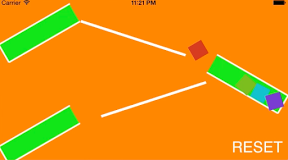

ころがる箱をスタックして遊ぶiPhoneアプリのサンプルコードを描いてみます。
#import “ViewController.h”
#import <SpriteKit/SpriteKit.h>
@interface StackScene : SKScene
@end
@implementation StackScene
– (void)didMoveToView:(SKView *)view
{
self.backgroundColor = [SKColor orangeColor];
[self createBoxes];
[self createSlope];
[self createBalls];
[self createReset];
}
– (void)createBoxes
{
SKNode *boxA = [self createBox];
boxA.position = CGPointMake(80, 250);
boxA.zRotation = – 60 * (M_PI / 180.0);
SKNode *boxB = [self createBox];
boxB.position = CGPointMake(CGRectGetMaxX(self.frame) – 80, 150);
boxB.zRotation = 60 * (M_PI / 180.0);
SKNode *boxC = [self createBox];
boxC.position = CGPointMake(80, 50);
boxC.zRotation = – 60 * (M_PI / 180.0);
}
– (void)createSlope
{
for (int i=0; i<2; i++) {
SKSpriteNode *slope = [SKSpriteNode spriteNodeWithColor:[SKColor whiteColor] size:CGSizeMake(CGRectGetMaxX(self.frame) * 0.38, 5)];
if (i == 0) {
slope.position = CGPointMake(CGRectGetMidX(self.frame) – 20, 240);
slope.zRotation = –M_PI * 0.1;
} else {
slope.position = CGPointMake(CGRectGetMidX(self.frame) + 20, 120);
slope.zRotation = M_PI * 0.1;
}
[self addChild:slope];
slope.physicsBody = [SKPhysicsBody bodyWithRectangleOfSize:slope.size];
slope.physicsBody.dynamic = NO;
}
}
– (void)createBalls
{
for (int i=0; i<4; i++) {
dispatch_after(dispatch_time(DISPATCH_TIME_NOW, (int64_t)(0.5 * i * NSEC_PER_SEC)), dispatch_get_main_queue(), ^{
SKSpriteNode *ball = [SKSpriteNode spriteNodeWithColor:[SKColor colorWithHue:0.25 * i saturation:0.8 brightness:0.8 alpha:1.0] size:CGSizeMake(30, 30)];
ball.name = @”ball”;
ball.position = CGPointMake(140, 280);
[self addChild:ball];
ball.physicsBody = [SKPhysicsBody bodyWithCircleOfRadius:16];
ball.physicsBody.friction = 0.3;
});
}
}
– (SKNode *)createBox
{
UIBezierPath *path = [UIBezierPath bezierPath];
[path moveToPoint:CGPointMake(-20, 80)];
[path addLineToPoint:CGPointMake(-20, –80)];
[path addLineToPoint:CGPointMake(20, –80)];
[path addLineToPoint:CGPointMake(20, 80)];
SKShapeNode *box = [SKShapeNode node];
box.name = @”box”;
box.path = path.CGPath;
box.fillColor = [SKColor greenColor];
box.strokeColor = [SKColor whiteColor];
box.lineWidth = 2;
[self addChild:box];
box.physicsBody = [SKPhysicsBody bodyWithEdgeChainFromPath:path.CGPath];
return box;
}
– (void)createReset
{
SKLabelNode *reset = [SKLabelNode node];
reset.name = @”reset”;
reset.text = @”RESET”;
reset.fontSize = 30;
reset.position = CGPointMake(CGRectGetMaxX(self.frame) – 60, 15);
[self addChild:reset];
}
– (void)touchesBegan:(NSSet *)touches withEvent:(UIEvent *)event
{
CGPoint p = [[touches anyObject] locationInNode:self];
NSMutableArray *ballInBox = [NSMutableArray array];
SKNode *resetBtn = [self childNodeWithName:@”reset”];
if ([resetBtn containsPoint:p]) {
[self resetBall];
}
[self enumerateChildNodesWithName:@”box” usingBlock:^(SKNode *box, BOOL *stop) {
if ([box containsPoint:p]) {
[self enumerateChildNodesWithName:@”ball” usingBlock:^(SKNode *ball, BOOL *stop) {
if ([box containsPoint:ball.position]) {
[ballInBox addObject:ball];
}
}];
}
}];
if (ballInBox.count > 0) {
SKNode *ball = [ballInBox sortedArrayUsingComparator:^NSComparisonResult(SKNode *obj1, SKNode *obj2) {
return obj1.position.y < obj2.position.y;
}][0];
[ball.physicsBody applyImpulse:CGVectorMake(ball.position.x < 200 ? 20 : –20, 10)];
}
}
– (void)resetBall
{
[self enumerateChildNodesWithName:@”ball” usingBlock:^(SKNode *node, BOOL *stop) {
[node removeFromParent];
}];
[self createBalls];
}
@end
@interface ViewController ()
@end
@implementation ViewController
– (void)viewDidAppear:(BOOL)animated
{
SKView *spriteView = [[SKView alloc] initWithFrame:self.view.bounds];
[self.view addSubview:spriteView];
SKScene *scene = [[StackScene alloc] initWithSize:spriteView.frame.size];
[spriteView presentScene:scene];
}
@end