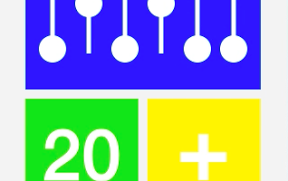

バイナリーなそろばんを動かすiPhoneアプリのサンプルコードを描いてみます。
#import “ViewController.h”
@interface ViewController ()
@property (nonatomic, weak) UILabel *number;
@property (nonatomic, strong) NSMutableArray *soroban;
@end
@implementation ViewController
– (void)viewDidLoad
{
[super viewDidLoad];
self.view.backgroundColor = [UIColor colorWithWhite:0.95 alpha:1.0];
[self createSoroban];
[self createNumberView];
[self createPlusButton];
UILabel *title = [[UILabel alloc] init];
title.text = @”Binary”;
title.font = [UIFont boldSystemFontOfSize:40];
[title sizeToFit];
title.textColor = [UIColor lightGrayColor];
title.center = CGPointMake(160, 360);
[self.view addSubview:title];
}
– (void)createSoroban
{
UIView *sorobanView = [[UIView alloc] initWithFrame:CGRectMake(30, 50, 260, 140)];
sorobanView.backgroundColor = [UIColor blueColor];
[self.view addSubview:sorobanView];
for (int i=0; i<6; i++) {
float x = 260 – 45 – i * 40;
UIView *slit = [[UIView alloc] initWithFrame:CGRectMake(x+12.5, 40, 5, 60)];
slit.backgroundColor = [UIColor whiteColor];
[sorobanView addSubview:slit];
UIView *bead = [[UIView alloc] initWithFrame:CGRectMake(x, 80, 30, 30)];
bead.backgroundColor = [UIColor whiteColor];
bead.layer.cornerRadius = 15;
[sorobanView addSubview:bead];
if (!self.soroban) {
self.soroban = [NSMutableArray array];
}
[self.soroban addObject:bead];
}
}
– (void)createNumberView
{
UIView *numberView = [[UIView alloc] initWithFrame:CGRectMake(30, 200, 125, 125)];
numberView.backgroundColor = [UIColor greenColor];
[self.view addSubview:numberView];
UILabel *numberLabel = [[UILabel alloc] init];
numberLabel.font = [UIFont boldSystemFontOfSize:80];
numberLabel.text = @”00″;
[numberLabel sizeToFit];
numberLabel.center = CGPointMake(62.5, 62.5);
numberLabel.textColor = [UIColor whiteColor];
[numberView addSubview:numberLabel];
self.number = numberLabel;
}
– (void)createPlusButton
{
UIButton *number = [UIButton buttonWithType:UIButtonTypeCustom];
number.frame = CGRectMake(165, 200, 125, 125);
number.backgroundColor = [UIColor yellowColor];
[number setTitle:@”+” forState:UIControlStateNormal];
number.titleLabel.font = [UIFont boldSystemFontOfSize:100];
number.titleEdgeInsets = UIEdgeInsetsMake(0, 0, 15, 0); // button title vertical align
[self.view addSubview:number];
[number addTarget:self action:@selector(addSoroban) forControlEvents:UIControlEventTouchUpInside];
}
– (void)addSoroban
{
// soroban view
BOOL increase = YES;
for (int i=0; i<6; i++) {
if (!increase) {
break;
}
UIView *bead = [self.soroban objectAtIndex:i];
bead.tag = (bead.tag + 1) % 2;
if (bead.tag == 0) {
increase = YES;
[UIView animateWithDuration:0.1 animations:^{
bead.center = CGPointMake(bead.center.x, bead.center.y + 50);
}];
} else {
increase = NO;
[UIView animateWithDuration:0.1 animations:^{
bead.center = CGPointMake(bead.center.x, bead.center.y – 50);
}];
}
}
// number view
self.number.text = [NSString stringWithFormat:@”%02d”, [self.number.text intValue] + 1];
}
– (void)didReceiveMemoryWarning
{
[super didReceiveMemoryWarning];
// Dispose of any resources that can be recreated.
}
@end