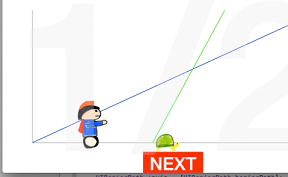

いつまでたってもアキレスが亀を追い抜けないというパラドックスなiPhoneアプリのサンプルコードを描いてみます。

#import “ViewController.h”
@interface ViewController ()
@property (nonatomic, weak) UIView *achilles;
@property (nonatomic, weak) UIView *tortoise;
@end
#define startA CGPointMake(50, CGRectGetMaxY(self.view.bounds) – 50)
#define startT CGPointMake(250, CGRectGetMaxY(self.view.bounds) – 50)
#define velocityA 4.0
#define velocityT 1.0
@implementation ViewController
– (void)viewDidAppear:(BOOL)animated
{
[self createGraph];
[self createNextButton];
[self createAchillesAndTortoise];
// title
UILabel *title = [[UILabel alloc] init];
title.text = @”1/2″;
title.font = [UIFont boldSystemFontOfSize:350];
title.textColor = [UIColor colorWithWhite:0.9 alpha:0.3];
[title sizeToFit];
title.center = CGPointMake(CGRectGetMidX(self.view.bounds), CGRectGetMidY(self.view.bounds));
[self.view addSubview:title];
}
– (void)createGraph
{
UIBezierPath *axis = [UIBezierPath bezierPath];
[axis moveToPoint:CGPointMake(50, 50)];
[axis addLineToPoint:CGPointMake(50, CGRectGetMaxY(self.view.bounds) – 50)];
[axis addLineToPoint:CGPointMake(CGRectGetMaxX(self.view.bounds) – 50, CGRectGetMaxY(self.view.bounds) – 50)];
CAShapeLayer *axisLayer = [CAShapeLayer layer];
axisLayer.path = axis.CGPath;
axisLayer.fillColor = [UIColor clearColor].CGColor;
axisLayer.strokeColor = [UIColor lightGrayColor].CGColor;
[self.view.layer addSublayer:axisLayer];
UIBezierPath *ba = [UIBezierPath bezierPath];
[ba moveToPoint:startA];
[ba addLineToPoint:CGPointMake(120 * velocityA + startA.x, 50)];
CAShapeLayer *la = [CAShapeLayer layer];
la.path = ba.CGPath;
la.fillColor = [UIColor clearColor].CGColor;
la.strokeColor = [UIColor blueColor].CGColor;
[self.view.layer addSublayer:la];
UIBezierPath *bt = [UIBezierPath bezierPath];
[bt moveToPoint:startT];
[bt addLineToPoint:CGPointMake(120 * velocityT + startT.x, 50)];
CAShapeLayer *lt = [CAShapeLayer layer];
lt.path = bt.CGPath;
lt.fillColor = [UIColor clearColor].CGColor;
lt.strokeColor = [UIColor greenColor].CGColor;
[self.view.layer addSublayer:lt];
}
– (void)createNextButton
{
UILabel *next = [[UILabel alloc] initWithFrame:CGRectMake(0, 0, 100, 40)];
next.text = @”NEXT”;
next.center = CGPointMake(CGRectGetMidX(self.view.bounds), CGRectGetMaxY(self.view.bounds) – 15);
next.backgroundColor = [UIColor redColor];
next.textAlignment = NSTextAlignmentCenter;
next.textColor = [UIColor whiteColor];
next.font = [UIFont boldSystemFontOfSize:30];
[self.view addSubview:next];
next.userInteractionEnabled = YES;
[next addGestureRecognizer:[[UITapGestureRecognizer alloc] initWithTarget:self action:@selector(next)]];
}
– (void)createAchillesAndTortoise
{
UIImageView *achilles = [[UIImageView alloc] initWithImage:[UIImage imageNamed:@”achilles”]];
achilles.frame = CGRectMake(0, 0, 50, 80);
achilles.center = CGPointMake(startA.x, startA.y – 30);
[self.view addSubview:achilles];
self.achilles = achilles;
UIImageView *tortoise = [[UIImageView alloc] initWithImage:[UIImage imageNamed:@”tortoise”]];
tortoise.frame = CGRectMake(0, 0, 40, 30);
tortoise.center = CGPointMake(startT.x, startT.y);
[self.view addSubview:tortoise];
self.tortoise = tortoise;
}
– (void)next
{
float moveAchilles = (self.tortoise.center.x – self.achilles.center.x) / 2.0;
float t = moveAchilles / velocityA;
[UIView animateWithDuration:0.3 animations:^{
self.achilles.center = CGPointMake(self.achilles.center.x + moveAchilles, self.achilles.center.y);
self.tortoise.center = CGPointMake(self.tortoise.center.x + t * velocityT, self.tortoise.center.y);
}];
}
@end