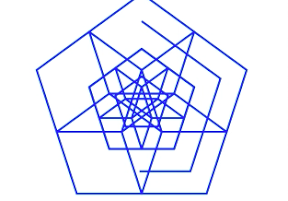

五角形をたくさん描いて面白い形をつくるiPhoneアプリのサンプルコードを描いてみます。
#import “ViewController.h”
@interface ViewController ()
@property (nonatomic) int counter;
@end
@implementation ViewController
– (void)viewDidLoad
{
[super viewDidLoad];
[self createAddButton];
}
– (void)createAddButton
{
UIButton *btn = [UIButton buttonWithType:UIButtonTypeCustom];
btn.frame = CGRectMake(0, 0, 200, 40);
btn.backgroundColor = [UIColor blueColor];
[btn setTitle:@”Add” forState:UIControlStateNormal];
btn.center = CGPointMake(160, CGRectGetMaxY(self.view.frame) – 50);
[self.view addSubview:btn];
[btn addTarget:self action:@selector(add:) forControlEvents:UIControlEventTouchUpInside];
}
– (void)add:(UIButton *)sender
{
[UIView animateWithDuration:0.1 animations:^{
sender.alpha = 0.3;
} completion:^(BOOL finished) {
[UIView animateWithDuration:0.1 animations:^{
sender.alpha = 1.0;
}];
}];
CGPoint o = CGPointMake(160, 200);
if (self.counter % 2) {
float dAngle = 2.0 * M_PI / 5.0;
float r = 30 * (self.counter / 2 + 1);
for (int i=0; i<5; i++) {
float angle = dAngle * (i – 1.25);
float x = r * cos(angle) + o.x;
float y = r * sin(angle) + o.y;
CALayer *l = [self drawPentagonAtCenter:CGPointMake(x, y) radius:30 * (self.counter / 2 + 1)];
[self startDraw:l duration:2.0];
}
} else {
CALayer *l = [self drawPentagonAtCenter:o radius:30 * (self.counter / 2 + 1)];
[self startDraw:l duration:2.0];
}
self.counter++;
}
– (CALayer *)drawPentagonAtCenter:(CGPoint)o radius:(float)r
{
float dAngle = 2.0 * M_PI / 5.0;
UIBezierPath *path = [UIBezierPath bezierPath];
for (int i=0; i<5; i++) {
float angle = dAngle * (i – 1.25);
float x = r * cos(angle) + o.x;
float y = r * sin(angle) + o.y;
if (i == 0)
[path moveToPoint:CGPointMake(x, y)];
else
[path addLineToPoint:CGPointMake(x, y)];
}
[path closePath];
CAShapeLayer *pentagon = [CAShapeLayer layer];
pentagon.path = path.CGPath;
pentagon.strokeColor = [UIColor blueColor].CGColor;
pentagon.lineWidth = 2;
pentagon.fillColor = [UIColor clearColor].CGColor;
[self.view.layer addSublayer:pentagon];
return pentagon;
}
– (void)startDraw:(CALayer*)l duration:(float)duration
{
CABasicAnimation *a = [CABasicAnimation animationWithKeyPath:@”strokeEnd”];
a.duration = duration;
a.fromValue = @0;
a.toValue = @1;
[l addAnimation:a forKey:@”strokeEnd”];
}
– (void)didReceiveMemoryWarning
{
[super didReceiveMemoryWarning];
// Dispose of any resources that can be recreated.
}
@end