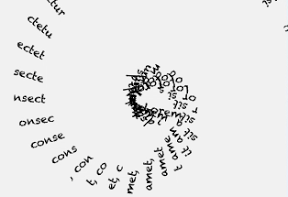

スライダーを操作してテキストを螺旋状にくるくるさせるiPhoneアプリのサンプルコードを描いてみます。
#import “ViewController.h”
@interface Spiral : UIView
@property (nonatomic) int rangeLevel;
@property (nonatomic) float curveLevel;
@end
@implementation Spiral
-(id)initWithFrame:(CGRect)frame
{
self = [super initWithFrame:frame];
if (self) {
self.backgroundColor = [UIColor clearColor];
}
return self;
}
– (void)drawRect:(CGRect)rect
{
NSLayoutManager *layoutManager;
NSTextContainer *textContainer;
NSString *words = @”Lorem ipsum dolor sit amet, consectetur adipisicing elit, sed do eiusmod tempor incididunt ut labore et dolore magna aliqua. Ut enim ad minim veniam, quis nostrud exercitation ullamco laboris nisi ut aliquip ex ea commodo consequat. Duis aute irure dolor in reprehenderit in voluptate velit esse cillum dolore eu fugiat nulla pariatur. Excepteur sint occaecat cupidatat non proident, sunt in culpa qui officia deserunt mollit anim id est laborum.”;
NSAttributedString *atts = [[NSAttributedString alloc] initWithString:words attributes:@{NSFontAttributeName: [UIFont fontWithName:@”Chalkduster” size:12]}];
NSTextStorage *textStorage = [[NSTextStorage alloc] initWithAttributedString:atts];
layoutManager = [[NSLayoutManager alloc] init];
textContainer = [[NSTextContainer alloc] init];
[layoutManager addTextContainer:textContainer];
[textStorage addLayoutManager:layoutManager];
CGContextRef ctx = UIGraphicsGetCurrentContext();
CGContextTranslateCTM(ctx, 160, 300);
UIGraphicsPushContext(ctx);
for (int i=0; i<100; i++) {
CGContextRotateCTM(ctx, self.curveLevel);
[layoutManager drawGlyphsForGlyphRange:NSMakeRange(i, self.rangeLevel) atPoint:CGPointMake(-12.0 * i, 0)];
}
UIGraphicsPopContext();
}
@end
@interface ViewController ()
@property (nonatomic, weak) Spiral *canvas;
@end
@implementation ViewController
– (void)viewDidAppear:(BOOL)animated
{
self.view.backgroundColor = [UIColor colorWithWhite:0.94 alpha:1];
Spiral *v = [[Spiral alloc] initWithFrame:self.view.bounds];
[self.view addSubview:v];
self.canvas = v;
UISlider *sliderA = [[UISlider alloc] init];
sliderA.tag = 1;
sliderA.minimumValue = 0;
sliderA.maximumValue = 1;
[sliderA sizeToFit];
sliderA.center = CGPointMake(160, 450);
[self.view addSubview:sliderA];
[sliderA addTarget:self action:@selector(change:) forControlEvents:UIControlEventValueChanged];
UISlider *sliderB = [[UISlider alloc] init];
sliderB.tag = 2;
sliderA.minimumValue = 1;
sliderA.maximumValue = 10;
[sliderB sizeToFit];
sliderB.center = CGPointMake(160, 500);
[self.view addSubview:sliderB];
[sliderB addTarget:self action:@selector(change:) forControlEvents:UIControlEventValueChanged];
}
– (void)change:(UISlider *)sender
{
switch (sender.tag) {
case 1:
self.canvas.rangeLevel = sender.value;
break;
case 2:
self.canvas.curveLevel = sender.value;
break;
default:
break;
}
[self.canvas setNeedsDisplay];
}
– (void)didReceiveMemoryWarning
{
[super didReceiveMemoryWarning];
// Dispose of any resources that can be recreated.
}
@end