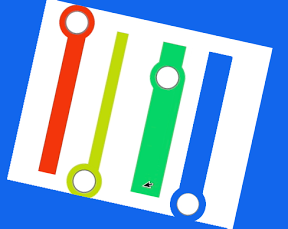

マスキングテープを横にピーッと貼ってお絵書きなiPhoneアプリのサンプルコードを描いてみます。
#import “ViewController.h”
@interface ViewController ()
@property (nonatomic, weak) UIView *tapview;
@property (nonatomic, strong) CAShapeLayer *tapeLayer;
@property (nonatomic, strong) UIBezierPath *path;
@end
@implementation ViewController
– (void)viewDidLoad
{
[super viewDidLoad];
[self createTapeLayer];
[self createTapes];
[NSTimer scheduledTimerWithTimeInterval:0.01 target:self selector:@selector(tick:) userInfo:nil repeats:YES];
}
– (void)createTapes
{
for (int i=0; i<4; i++) {
float y = i * 80 + 60;
UIView *tape = [self createTape:[UIColor colorWithHue:i*0.2 saturation:0.9 brightness:0.9 alpha:1]];
tape.center = CGPointMake(30, y);
[self.view addSubview:tape];
}
}
– (UIView *)createTape:(UIColor *)color
{
UIView *tape = [[UIView alloc] initWithFrame:CGRectMake(0, 0, 60, 60)];
tape.tag = 1;
tape.backgroundColor = color;
tape.layer.cornerRadius = 30;
[self.view addSubview:tape];
UIView *v = [[UIView alloc] initWithFrame:CGRectMake(0, 0, 40, 40)];
v.backgroundColor = [UIColor whiteColor];
v.layer.cornerRadius = 20;
v.layer.borderWidth = 2;
v.layer.borderColor = [UIColor grayColor].CGColor;
v.center = CGPointMake(30, 30);
v.userInteractionEnabled = NO;
[tape addSubview:v];
return tape;
}
– (void)createTapeLayer
{
self.tapeLayer = [CAShapeLayer layer];
self.tapeLayer.fillColor = [UIColor clearColor].CGColor;
self.tapeLayer.lineWidth = 10;
[self.view.layer insertSublayer:self.tapeLayer atIndex:0];
}
– (void)touchesBegan:(NSSet *)touches withEvent:(UIEvent *)event
{
UIView *hit = [self.view hitTest:[[touches anyObject] locationInView:self.view] withEvent:nil];
if (hit.tag == 1 && self.tapview == nil) {
self.tapview = hit;
}
}
– (void)tick:(NSTimer *)sender
{
if (self.tapview) {
if (!self.path) {
self.path = [UIBezierPath bezierPath];
}
if (self.tapview.tag == 1) {
[self createTapeLayer];
self.tapeLayer.strokeColor = self.tapview.backgroundColor.CGColor;
if (self.tapview.center.x <= 30) {
self.tapview.tag = 2;
} else {
self.tapview.tag = 3;
}
[self.path moveToPoint:CGPointMake(self.tapview.center.x, self.tapview.center.y + 25)];
} else if (self.tapview.tag == 2){
self.tapview.center = CGPointMake(self.tapview.center.x + 2, self.tapview.center.y);
[self.path addLineToPoint:CGPointMake(self.tapview.center.x, self.tapview.center.y + 25)];
self.tapeLayer.path = self.path.CGPath;
if (self.tapview.center.x >= 290) {
self.tapview.tag = 1;
self.tapview.center = CGPointMake(self.tapview.center.x, self.tapview.center.y + 10);
self.tapview = nil;
self.path = nil;
}
} else if (self.tapview.tag == 3) {
self.tapview.center = CGPointMake(self.tapview.center.x – 2, self.tapview.center.y);
[self.path addLineToPoint:CGPointMake(self.tapview.center.x, self.tapview.center.y + 25)];
self.tapeLayer.path = self.path.CGPath;
if (self.tapview.center.x <= 30) {
self.tapview.tag = 1;
self.tapview.center = CGPointMake(self.tapview.center.x, self.tapview.center.y + 10);
self.tapview = nil;
self.path = nil;
}
}
}
}
@end