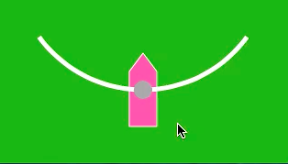

弧の上を左右にスライドする棒をピョンピョン飛ばすiPhoneアプリのサンプルコードを描いてみます。
#import “ViewController.h”
@interface ViewController ()
@property (nonatomic, weak) UIView *arrow;
@property (nonatomic, weak) UIView *pin;
@end
@implementation ViewController
– (void)viewDidLoad
{
[super viewDidLoad];
self.view.backgroundColor = [UIColor colorWithRed:0.1 green:0.8 blue:0.1 alpha:1];
[self createArrow];
[self createGuideLine];
[self createPin];
}
– (void)createArrow
{
UIView *arrow = [[UIView alloc] initWithFrame:CGRectMake(0, 0, 30, 80)];
arrow.backgroundColor = [UIColor clearColor];
arrow.center = CGPointMake(CGRectGetMidX(self.view.frame), 400);
[self.view addSubview:arrow];
self.arrow = arrow;
UIBezierPath *path = [UIBezierPath bezierPath];
[path moveToPoint:CGPointMake(15, 0)];
[path addLineToPoint:CGPointMake(30, 20)];
[path addLineToPoint:CGPointMake(30, 80)];
[path addLineToPoint:CGPointMake(0, 80)];
[path addLineToPoint:CGPointMake(0, 20)];
[path closePath];
CAShapeLayer *l = [CAShapeLayer layer];
l.path = path.CGPath;
l.strokeColor = [UIColor whiteColor].CGColor;
float hue = (arc4random() % 10) * 0.1;
l.fillColor = [UIColor colorWithHue:hue saturation:0.8 brightness:1 alpha:1].CGColor;
[arrow.layer addSublayer:l];
}
– (void)createGuideLine
{
CGPoint o = CGPointMake(CGRectGetMidX(self.view.frame), 260);
UIBezierPath *path = [UIBezierPath bezierPathWithArcCenter:o radius:140 startAngle:0.2*M_PI endAngle:0.8*M_PI clockwise:YES];
CAShapeLayer *l = [CAShapeLayer layer];
l.path = path.CGPath;
l.fillColor = [UIColor clearColor].CGColor;
l.strokeColor = [UIColor whiteColor].CGColor;
l.lineWidth = 5;
[self.view.layer addSublayer:l];
}
– (void)createPin
{
UIView *pin = [[UIView alloc] initWithFrame:CGRectMake(0, 0, 20, 20)];
pin.layer.cornerRadius = 10;
pin.backgroundColor = [UIColor lightGrayColor];
pin.center = self.arrow.center;
pin.userInteractionEnabled = NO;
[self.view addSubview:pin];
self.pin = pin;
}
– (void)touchesMoved:(NSSet *)touches withEvent:(UIEvent *)event
{
CGPoint o = CGPointMake(CGRectGetMidX(self.view.frame), 260);
CGPoint p = [[touches anyObject] locationInView:self.view];
if (p.x > 40 && p.x < 280) {
float y = sqrtf(powf(140, 2) – powf(p.x – o.x, 2)) + o.y;
self.arrow.center = CGPointMake(p.x, y);
self.pin.center = self.arrow.center;
float da = M_PI / 360.0;
self.arrow.transform = CGAffineTransformMakeRotation(da * (160.0-p.x));
}
}
– (void)touchesEnded:(NSSet *)touches withEvent:(UIEvent *)event
{
CGFloat angle = [(NSNumber *)[self.arrow.layer valueForKeyPath:@”transform.rotation.z”] floatValue] + M_PI/2.0;
[UIView animateWithDuration:0.5 animations:^{
float r = (arc4random() % 100) + 200;
float x = -r * cos(angle) + self.arrow.center.x;
float y = -r * sin(angle) + self.arrow.center.y;
self.arrow.center = CGPointMake(x, y);
} completion:^(BOOL finished) {
[self createArrow];
[self.view addSubview:self.pin];
self.pin.center = self.arrow.center;
}];
}
@end