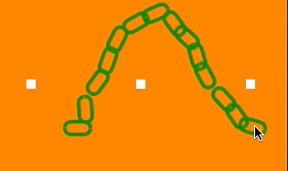

鎖をじゃらじゃらと表示するiPhoneアプリのサンプルコードを描いてみます。
#import “ViewController.h”
@import SpriteKit;
@interface ChainScene : SKScene
@property (nonatomic, weak) SKNode *node;
@end
@implementation ChainScene
– (void)didMoveToView:(SKView *)view
{
self.backgroundColor = [UIColor orangeColor];
self.physicsBody = [SKPhysicsBody bodyWithEdgeLoopFromRect:self.frame];
[self createPin];
}
– (void)createPin
{
for (int i=0; i<3; i++) {
SKSpriteNode *pin = [SKSpriteNode spriteNodeWithColor:[SKColor whiteColor] size:CGSizeMake(10, 10)];
pin.position = CGPointMake(i * 120 + 40, 300);
[self addChild:pin];
pin.physicsBody = [SKPhysicsBody bodyWithCircleOfRadius:2.5];
pin.physicsBody.dynamic = NO;
}
}
– (void)touchesBegan:(NSSet *)touches withEvent:(UIEvent *)event
{
self.physicsWorld.speed = 0;
}
– (void)touchesMoved:(NSSet *)touches withEvent:(UIEvent *)event
{
CGPoint p = [[touches anyObject] locationInNode:self];
float d = HUGE;
if (self.node) {
d = hypotf(self.node.position.x – p.x, self.node.position.y – p.y);
CGPoint p0 = [self.node convertPoint:CGPointMake(10, 0) toNode:self];
float angle = atan2(p0.x – p.x, p.y – p0.y);
if (d > 20) {
SKNode *node = [self createChainNode];
node.position = p;
node.zRotation = angle + M_PI_2;
SKPhysicsJointPin *pin = [SKPhysicsJointPin jointWithBodyA:self.node.physicsBody bodyB:node.physicsBody anchor:p0];
[self.physicsWorld addJoint:pin];
self.node = node;
}
} else {
SKNode *node = [self createChainNode];
node.position = p;
self.node = node;
}
}
– (void)touchesEnded:(NSSet *)touches withEvent:(UIEvent *)event
{
self.node = nil;
self.physicsWorld.speed = 1.0;
}
– (SKNode *)createChainNode
{
UIBezierPath *path = [UIBezierPath bezierPathWithRoundedRect:CGRectMake(-14, –7, 28, 14) cornerRadius:7];
SKShapeNode *node = [SKShapeNode node];
node.path = path.CGPath;
node.fillColor = [SKColor clearColor];
node.strokeColor = [SKColor colorWithRed:0 green:0.6 blue:0 alpha:1];
node.lineWidth = 3;
[self addChild:node];
node.physicsBody = [SKPhysicsBody bodyWithRectangleOfSize:CGSizeMake(28, 14)];
return node;
}
@end
@interface ViewController ()
@end
@implementation ViewController
– (void)viewDidLoad
{
[super viewDidLoad];
SKView *spriteView = [[SKView alloc] initWithFrame:self.view.bounds];
[self.view addSubview:spriteView];
SKScene *scene = [[ChainScene alloc] initWithSize:spriteView.frame.size];
[spriteView presentScene:scene];
}
@end