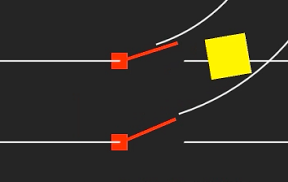

線路を切り替えて、電車?の進む方向をコントロールするよ。というかんじでiPhoneアプリのサンプルコードを描いてみます。
#import “ViewController.h”
@import SpriteKit;
@interface RailScene : SKScene
@property (nonatomic) BOOL up;
@end
@implementation RailScene
– (void)didMoveToView:(SKView *)view
{
self.physicsWorld.gravity = CGVectorMake(0, 0);
self.physicsBody = [SKPhysicsBody bodyWithEdgeLoopFromRect:self.frame];
[self createRailSwitch];
[self createRails];
[NSTimer scheduledTimerWithTimeInterval:2.0 target:self selector:@selector(goTrain) userInfo:nil repeats:YES];
}
– (void)createRails
{
CGPoint points[] = {
CGPointMake(0, 50), CGPointMake(200, 50),
CGPointMake(0, 150), CGPointMake(200, 150),
CGPointMake(280, 50), CGPointMake(500, 50),
CGPointMake(280, 150), CGPointMake(500, 150),
};
for (int i=0; i<4; i++) {
UIBezierPath *path = [UIBezierPath bezierPath];
[path moveToPoint:points[2*i]];
[path addLineToPoint:points[2*i+1]];
SKNode *n = [self createRail:path];
if (i>1) {
n.name = @”straight”;
}
}
CGPoint o = CGPointMake(180, 370);
for (int i=0; i<2; i++) {
UIBezierPath *path = [UIBezierPath bezierPath];
float r = 300 – i *90;
[path moveToPoint:CGPointMake(r*cos(-M_PI_2 * 0.8)+o.x, r*sin(-M_PI_2 * 0.8)+o.y)];
[path addArcWithCenter:o radius:r startAngle:-M_PI_2*0.8 endAngle:0 clockwise:YES];
SKNode *n = [self createRail:path];
n.name = @”curve”;
}
}
– (SKNode *)createRail:(UIBezierPath *)path
{
SKShapeNode *n = [SKShapeNode node];
n.path = path.CGPath;
[self addChild:n];
n.physicsBody = [SKPhysicsBody bodyWithEdgeChainFromPath:path.CGPath];
return n;
}
– (void)createRailSwitch
{
for (int i=0; i<2; i++) {
SKSpriteNode *p = [SKSpriteNode spriteNodeWithColor:[UIColor redColor] size:CGSizeMake(20, 20)];
p.position = CGPointMake(200, 50 + i*100);
[self addChild:p];
}
for (int i=0; i<2; i++) {
SKSpriteNode *bar = [SKSpriteNode spriteNodeWithColor:[SKColor redColor] size:CGSizeMake(70, 4)];
bar.name = @”switch bar”;
[self addChild:bar];
bar.physicsBody = [SKPhysicsBody bodyWithRectangleOfSize:bar.size];
bar.physicsBody.angularDamping = 1.0;
if (i == 0) {
bar.position = CGPointMake(240, 50);
} else {
bar.position = CGPointMake(240, 150);
}
SKPhysicsJointPin *pin = [SKPhysicsJointPin jointWithBodyA:bar.physicsBody bodyB:self.physicsBody anchor:CGPointMake(bar.position.x – 38, bar.position.y)];
pin.shouldEnableLimits = YES;
pin.upperAngleLimit = 0;
pin.lowerAngleLimit = (i == 0) ? –0.37 : –0.33;
pin.frictionTorque = 1.0;
[self.physicsWorld addJoint:pin];
}
}
– (void)touchesBegan:(NSSet *)touches withEvent:(UIEvent *)event
{
self.up = !self.up;
}
– (void)goTrain
{
SKSpriteNode *n = [SKSpriteNode spriteNodeWithColor:[SKColor yellowColor] size:CGSizeMake(50, 50)];
n.position = CGPointMake(0, 80);
[self addChild:n];
n.physicsBody = [SKPhysicsBody bodyWithCircleOfRadius:25];
[n.physicsBody applyImpulse:CGVectorMake(50, 0)];
dispatch_after(dispatch_time(DISPATCH_TIME_NOW, (int64_t)(1.0 * NSEC_PER_SEC)), dispatch_get_main_queue(), ^{
[n removeFromParent];
});
}
– (void)update:(NSTimeInterval)currentTime
{
[self enumerateChildNodesWithName:@”straight” usingBlock:^(SKNode *node, BOOL *stop) {
node.physicsBody.categoryBitMask = self.up ? 0: 0x1 << 1;
}];
[self enumerateChildNodesWithName:@”curve” usingBlock:^(SKNode *node, BOOL *stop) {
node.physicsBody.categoryBitMask = self.up ? 0x1 << 1 : 0;
}];
[self enumerateChildNodesWithName:@”switch bar” usingBlock:^(SKNode *node, BOOL *stop) {
[node.physicsBody applyTorque:self.up ? 10 : –10];
}];
}
@end
@interface ViewController ()
@end
@implementation ViewController
– (void)viewDidAppear:(BOOL)animated
{
[super viewDidAppear:animated];
SKView *spriteView = [[SKView alloc] initWithFrame:self.view.bounds];
[self.view addSubview:spriteView];
SKScene *scene = [[RailScene alloc] initWithSize:spriteView.frame.size];
[spriteView presentScene:scene];
}
@end