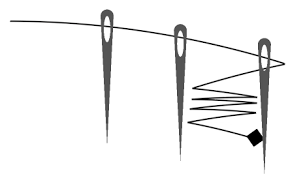

針の穴に糸をとおしてみよう。というiPhoneアプリのサンプルコードを描いてみます。
#import “ViewController.h”
@import SpriteKit;
@interface NeedleScene : SKScene
@property (nonatomic, weak) SKShapeNode *stringShape;
@property (nonatomic) CGPoint last;
@property (nonatomic, strong) NSMutableArray *bodies;
@end
@implementation NeedleScene
– (void)didMoveToView:(SKView *)view
{
self.backgroundColor = [SKColor whiteColor];
self.physicsBody = [SKPhysicsBody bodyWithEdgeLoopFromRect:self.frame];
self.physicsBody.restitution = 1.0;
self.physicsWorld.speed = 0.1;
[self createNeedles];
[self createMarker];
}
– (void)createNeedles
{
for (int i=0; i<3; i++) {
SKNode *needle = [self createNeedle];
needle.position = CGPointMake(i * 120 + 200, 200 – i * 30);
}
}
– (SKNode *)createNeedle
{
SKNode *needle = [SKNode node];
[self addChild:needle];
for (NSString *name in @[@”needleFront”, @”needleBack”]) {
UIBezierPath *path = [UIBezierPath bezierPath];
[path moveToPoint:CGPointMake(-10, 80)];
[path addArcWithCenter:CGPointMake(0, 80) radius:10 startAngle:M_PI endAngle:0 clockwise:NO];
[path addLineToPoint:CGPointMake(0, –120)];
[path closePath];
CGRect hole = CGRectMake(-5, 40, 10, 40);
[path appendPath:[UIBezierPath bezierPathWithOvalInRect:hole]];
path.usesEvenOddFillRule = YES;
SKShapeNode *part = [SKShapeNode node];
part.name = name;
part.path = path.CGPath;
part.fillColor = [SKColor darkGrayColor];
part.strokeColor = [SKColor clearColor];
part.zPosition = [name isEqual:@”needleFront”] ? 0 : 3;
[needle addChild:part];
}
needle.physicsBody = [SKPhysicsBody bodyWithBodies:@[[SKPhysicsBody bodyWithRectangleOfSize:CGSizeMake(10, 20) center:CGPointMake(0, 90)], [SKPhysicsBody bodyWithRectangleOfSize:CGSizeMake(10, 160) center:CGPointMake(0, –40)]]];
needle.physicsBody.allowsRotation = NO;
needle.physicsBody.restitution = 1.0;
needle.physicsBody.linearDamping = 0;
needle.physicsBody.categoryBitMask = 0x1 << 3;
return needle;
}
– (void)createMarker
{
SKSpriteNode *marker = [SKSpriteNode spriteNodeWithColor:[SKColor blackColor] size:CGSizeMake(20, 20)];
marker.name = @”marker”;
marker.position = CGPointMake(50, 250);
marker.zRotation = M_PI/4.0;
[self addChild:marker];
}
– (void)touchesBegan:(NSSet *)touches withEvent:(UIEvent *)event
{
CGPoint p = [[touches anyObject] locationInNode:self];
SKNode *hit = [self nodeAtPoint:p];
if ([hit.name isEqual:@”marker”]) {
hit.physicsBody = [SKPhysicsBody bodyWithCircleOfRadius:5];
hit.physicsBody.density = 0.1;
hit.physicsBody.categoryBitMask = 0x1 << 1;
hit.physicsBody.collisionBitMask = 0x1 << 3;
[hit.physicsBody applyImpulse:CGVectorMake(0.5, 0)];
}
}
– (void)didSimulatePhysics
{
SKNode *marker = [self childNodeWithName:@”marker”];
if (!marker.physicsBody) {
return;
}
self.last = marker.position;
if (!self.stringShape) {
self.stringShape = [SKShapeNode node];
self.stringShape.strokeColor = [SKColor blackColor];
self.stringShape.zPosition = 1;
[self addChild:self.stringShape];
UIBezierPath *path = [UIBezierPath bezierPath];
[path moveToPoint:marker.position];
self.stringShape.path = path.CGPath;
self.bodies = [NSMutableArray array];
return;
}
CGMutablePathRef path = CGPathCreateMutableCopy(self.stringShape.path);
CGPathAddLineToPoint(path, NULL, marker.position.x, marker.position.y);
self.stringShape.path = path;
SKPhysicsBody *body = [SKPhysicsBody bodyWithEdgeFromPoint:self.last toPoint:marker.position];
[self.bodies addObject:body];
self.stringShape.physicsBody = [SKPhysicsBody bodyWithBodies:self.bodies];
self.stringShape.physicsBody.categoryBitMask = 0x1 << 2;
self.stringShape.physicsBody.collisionBitMask = 0x1 << 3;
}
@end
@interface ViewController ()
@end
@implementation ViewController
– (void)viewDidAppear:(BOOL)animated
{
[super viewDidAppear:animated];
SKView *spriteView = [[SKView alloc] initWithFrame:self.view.bounds];
[self.view addSubview:spriteView];
SKScene *scene = [[NeedleScene alloc] initWithSize:spriteView.frame.size];
[spriteView presentScene:scene];
}
@end