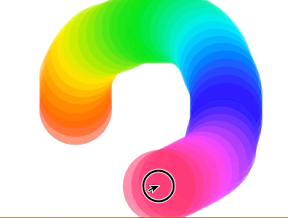

Colorのhueを使って、カラフルな輪を画面に書いていくiPhoneアプリのサンプルコード
#import “ViewController.h”
@interface ViewController ()
@property (nonatomic, weak) CAShapeLayer *last;
@end
@implementation ViewController
– (void)viewDidLoad
{
self.view.layer.borderColor = [UIColor brownColor].CGColor;
self.view.layer.borderWidth = 10;
[super viewDidLoad];
}
– (void)touchesBegan:(NSSet *)touches withEvent:(UIEvent *)event
{
CGPoint p = [[touches anyObject] locationInView:self.view];
[self createColorCircle:p];
}
– (void)touchesMoved:(NSSet *)touches withEvent:(UIEvent *)event
{
CGPoint p = [[touches anyObject] locationInView:self.view];
float d = hypotf(p.x – self.last.position.x, p.y – self.last.position.y);
if (d > 10) {
[self createColorCircle:p];
}
}
– (void)createColorCircle:(CGPoint)p
{
UIBezierPath *path = [UIBezierPath bezierPathWithArcCenter:CGPointZero radius:50 startAngle:0 endAngle:2.0*M_PI clockwise:NO];
CAShapeLayer *l = [CAShapeLayer layer];
l.position = p;
l.path = path.CGPath;
l.lineWidth = 0;
CGFloat hue;
if (self.last) {
[[UIColor colorWithCGColor:self.last.fillColor] getHue:&hue saturation:NULL brightness:NULL alpha:NULL];
} else {
hue = 0;
}
if (hue == 1) {
hue = 0;
}
l.fillColor = [[UIColor colorWithHue:hue + 0.02 saturation:1 brightness:1 alpha:1] colorWithAlphaComponent:0.5].CGColor;
[self.view.layer addSublayer:l];
self.last = l;
}
@end