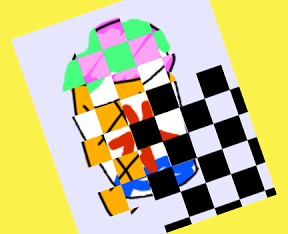

2つの絵を格子状のマスクを使って混ぜるiPhoneアプリのサンプルコードを描いてみます。
#import “ViewController.h”
@interface ViewController ()
@property (nonatomic, weak) CALayer *grid;
@end
@implementation ViewController
– (void)viewDidLoad
{
[super viewDidLoad];
self.view.backgroundColor = [UIColor colorWithRed:0.9 green:0.9 blue:1 alpha:1];
UIImageView *icecream = [[UIImageView alloc] initWithImage:[UIImage imageNamed:@”icecream”]];
icecream.layer.mask = [self createGridMask:0 color:[UIColor whiteColor]];
icecream.frame = CGRectMake(50, 100, icecream.frame.size.width, icecream.frame.size.height);
[self.view addSubview:icecream];
UIImageView *crashice = [[UIImageView alloc] initWithImage:[UIImage imageNamed:@”crashice”]];
crashice.layer.mask = [self createGridMask:1 color:[UIColor whiteColor]];
crashice.frame = CGRectMake(50, 100, crashice.frame.size.width, crashice.frame.size.height);
[self.view addSubview:crashice];
CALayer *l = [self createGrid];
l.position = CGPointMake(180, 400);
[self.view.layer addSublayer:l];
self.grid = l;
}
– (CALayer *)createGridMask:(int)type color:(UIColor*)color
{
// 5×5 grid
CALayer *mask = [CALayer layer];
mask.backgroundColor = [UIColor blackColor].CGColor;
for (int i=0; i<49; i++) {
float x = (i % 5) * 40;
float y = (i / 5) * 40;
CALayer *grid = [CALayer layer];
if ((i % 2) == type)
grid.backgroundColor = color.CGColor;
grid.frame = CGRectMake(x, y, 40, 40);
[mask addSublayer:grid];
}
return mask;
}
– (CALayer *)createGrid
{
// 5×5 grid
CALayer *mask = [CALayer layer];
for (int i=0; i<49; i++) {
float x = (i % 7) * 40;
float y = (i / 7) * 40;
CALayer *grid = [CALayer layer];
if (i % 2)
grid.backgroundColor = [UIColor blackColor].CGColor;
grid.frame = CGRectMake(x, y, 40, 40);
[mask addSublayer:grid];
}
return mask;
}
– (void)touchesMoved:(NSSet *)touches withEvent:(UIEvent *)event
{
CGPoint p = [[touches anyObject] locationInView:self.view];
self.grid.position = p;
}
@end