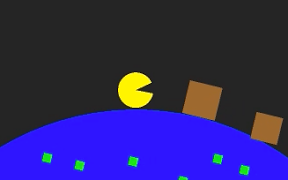

くるくるまわる地球の上でジャンプという感じでiPhoneアプリのサンプルコードを描いてみます。
#import “ViewController.h”
@import SpriteKit;
@interface EarthScene : SKScene
@end
@implementation EarthScene
– (void)didMoveToView:(SKView *)view
{
self.view.backgroundColor = [UIColor colorWithWhite:0.98 alpha:1];
self.physicsBody = [SKPhysicsBody bodyWithCircleOfRadius:500];
self.physicsBody.dynamic = NO;
self.physicsBody.categoryBitMask = 0x0;
[self createEarth];
[self createPlayer];
}
– (void)createEarth
{
UIBezierPath *path = [UIBezierPath bezierPathWithArcCenter:CGPointZero radius:300 startAngle:0 endAngle:2.0*M_PI clockwise:NO];
SKShapeNode *earth = [SKShapeNode node];
earth.name = @”earth”;
earth.path = path.CGPath;
earth.fillColor = [UIColor blueColor];
earth.position = CGPointMake(CGRectGetMidX(self.frame), –200);
[self addChild:earth];
earth.physicsBody = [SKPhysicsBody bodyWithCircleOfRadius:300];
for (int i=0; i<50; i++) {
// pattern
float r = arc4random() % 100 + 180;
float x = r * cos(i * M_PI / 25.0);
float y = r * sin(i * M_PI / 25.0);
SKSpriteNode *green = [SKSpriteNode spriteNodeWithColor:[SKColor greenColor] size:CGSizeMake(10, 10)];
green.position = CGPointMake(x, y);
[earth addChild:green];
// hardle
float h = arc4random() % 30 + 10;
if ((i % 8) == 0) {
float x = (300 + h * 0.5) * cos(i * M_PI / 25.0);
float y = (300 + h * 0.5) * sin(i * M_PI / 25.0);
SKSpriteNode *hardle = [SKSpriteNode spriteNodeWithColor:[SKColor brownColor] size:CGSizeMake(h, h)];
hardle.position = CGPointMake(x, y);
[earth addChild:hardle];
hardle.physicsBody = [SKPhysicsBody bodyWithRectangleOfSize:hardle.size];
SKPhysicsJointFixed *fix = [SKPhysicsJointFixed jointWithBodyA:hardle.physicsBody bodyB:earth.physicsBody anchor:[earth convertPoint:hardle.position toNode:self]];
[self.physicsWorld addJoint:fix];
}
}
SKPhysicsJointPin *pin = [SKPhysicsJointPin jointWithBodyA:self.physicsBody bodyB:earth.physicsBody anchor:earth.position];
[self.physicsWorld addJoint:pin];
}
– (void)createPlayer
{
UIBezierPath *path = [UIBezierPath bezierPathWithArcCenter:CGPointZero radius:20.0 startAngle:0 endAngle:1.8*M_PI clockwise:YES];
[path addLineToPoint:CGPointZero];
[path closePath];
SKShapeNode *player = [SKShapeNode node];
player.name = @”player”;
player.path = path.CGPath;
player.fillColor = [UIColor yellowColor];
player.position = CGPointMake(CGRectGetMidX(self.frame), 120);
[self addChild:player];
player.physicsBody = [SKPhysicsBody bodyWithCircleOfRadius:20];
player.physicsBody.linearDamping = 2.0;
SKPhysicsJointLimit *limit = [SKPhysicsJointLimit jointWithBodyA:self.physicsBody bodyB:player.physicsBody anchorA:CGPointMake(CGRectGetMidX(self.frame), CGRectGetMaxY(self.frame)) anchorB:CGPointMake(player.position.x, player.position.y + 18)];
[self.physicsWorld addJoint:limit];
}
– (void)update:(NSTimeInterval)currentTime
{
SKNode *earth = [self childNodeWithName:@”earth”];
earth.physicsBody.angularVelocity = 0.2;
}
– (void)touchesBegan:(NSSet *)touches withEvent:(UIEvent *)event
{
SKNode *player = [self childNodeWithName:@”player”];
[player.physicsBody applyImpulse:CGVectorMake(5, 30)];
}
@end
@interface ViewController ()
@end
@implementation ViewController
– (void)viewDidAppear:(BOOL)animated
{
[super viewDidAppear:animated];
SKView *spriteView = [[SKView alloc] initWithFrame:self.view.bounds];
[self.view addSubview:spriteView];
SKScene *scene = [[EarthScene alloc] initWithSize:spriteView.frame.size];
[spriteView presentScene:scene];
}
@end