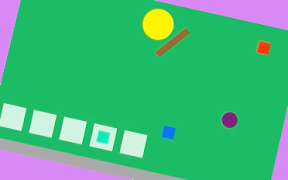

盾を回して、ボールを跳ね返すiPhoneアプリのサンプルコードを描いてみます。
#import “ViewController.h”
@import SpriteKit;
@interface ViewController () <SKSceneDelegate, SKPhysicsContactDelegate>
@property (nonatomic, weak) SKScene *scene;
@property (nonatomic) BOOL turn;
@end
@implementation ViewController
– (void)viewDidLoad {
[super viewDidLoad];
self.view.backgroundColor = [UIColor lightGrayColor];
[self setupScene];
[self createShield];
[self createBall];
[self createApples];
[self createButton];
}
– (void)setupScene
{
float w = CGRectGetMaxX(self.view.bounds);
SKView *spriteView = [[SKView alloc] initWithFrame:CGRectMake(0, 0, w, w)];
spriteView.center = CGPointMake(CGRectGetMidX(self.view.bounds), CGRectGetMidY(self.view.bounds));
[self.view addSubview:spriteView];
SKScene *scene = [[SKScene alloc] initWithSize:spriteView.frame.size];
scene.delegate = self;
scene.backgroundColor = [UIColor colorWithHue:0.4 saturation:0.8 brightness:0.8 alpha:1];
[spriteView presentScene:scene];
scene.physicsWorld.contactDelegate = self;
scene.physicsWorld.gravity = CGVectorMake(0, 0);
scene.physicsBody = [SKPhysicsBody bodyWithEdgeLoopFromRect:spriteView.bounds];
self.scene = scene;
}
– (void)createShield
{
UIBezierPath *path = [UIBezierPath bezierPathWithArcCenter:CGPointZero radius:20 startAngle:0 endAngle:2.0*M_PI clockwise:NO];
SKShapeNode *player = [SKShapeNode node];
player.name = @”player”;
player.path = path.CGPath;
player.fillColor = [SKColor yellowColor];
player.position = CGPointMake(CGRectGetMidX(self.scene.view.bounds), CGRectGetMidY(self.scene.view.bounds));
[self.scene addChild:player];
player.physicsBody = [SKPhysicsBody bodyWithCircleOfRadius:20];
player.physicsBody.categoryBitMask = 0x1 << 1;
SKPhysicsJointPin *pin = [SKPhysicsJointPin jointWithBodyA:player.physicsBody bodyB:self.scene.physicsBody anchor:player.position];
pin.frictionTorque = 1.0;
[self.scene.physicsWorld addJoint:pin];
SKSpriteNode *shield = [SKSpriteNode spriteNodeWithColor:[SKColor brownColor] size:CGSizeMake(8, 50)];
shield.position = CGPointMake(30, 0);
[player addChild:shield];
shield.physicsBody = [SKPhysicsBody bodyWithRectangleOfSize:shield.size];
shield.physicsBody.restitution = 1.0;
shield.physicsBody.categoryBitMask = 0x1 << 2;
SKPhysicsJointFixed *fix = [SKPhysicsJointFixed jointWithBodyA:player.physicsBody bodyB:shield.physicsBody anchor:player.position];
[self.scene.physicsWorld addJoint:fix];
}
– (void)createBall
{
UIBezierPath *path = [UIBezierPath bezierPathWithArcCenter:CGPointZero radius:10 startAngle:0 endAngle:2.0*M_PI clockwise:NO];
SKShapeNode *ball = [SKShapeNode node];
ball.path = path.CGPath;
ball.position = CGPointMake(50, 50);
ball.fillColor = [SKColor purpleColor];
[self.scene addChild:ball];
ball.physicsBody = [SKPhysicsBody bodyWithCircleOfRadius:10];
ball.physicsBody.categoryBitMask = 0x1 << 3;
ball.physicsBody.restitution = 1.0;
ball.physicsBody.friction = 0.0;
ball.physicsBody.linearDamping = 0.0;
[ball.physicsBody applyImpulse:CGVectorMake(10, 10)];
}
– (void)createApples
{
for (int i=0; i<5; i++) {
SKSpriteNode *box = [SKSpriteNode spriteNodeWithColor:[[SKColor whiteColor] colorWithAlphaComponent:0.8] size:CGSizeMake(30, 30)];
box.name = [NSString stringWithFormat:@”box%d”, i];
box.position = CGPointMake(i*40 + 30, 30);
[self.scene addChild:box];
float x = 140 * cos(M_PI/2.5 * i) + CGRectGetMidX(self.scene.view.bounds);
float y = 140 * sin(M_PI/2.5 * i) + CGRectGetMidX(self.scene.view.bounds);
SKSpriteNode *apple = [SKSpriteNode spriteNodeWithColor:[SKColor colorWithHue:0.15 * i saturation:0.9 brightness:1 alpha:1] size:CGSizeMake(15, 15)];
apple.name = [NSString stringWithFormat:@”apple%d”, i];
apple.position = CGPointMake(x, y);
[self.scene addChild:apple];
apple.physicsBody = [SKPhysicsBody bodyWithRectangleOfSize:apple.size];
apple.physicsBody.categoryBitMask = 0x1 << 4;
apple.physicsBody.contactTestBitMask = 0x1 << 3;
}
}
– (void)createButton
{
UIButton *btn = [UIButton buttonWithType:UIButtonTypeCustom];
btn.frame= CGRectMake(0, 0, 50, 30);
[btn setBackgroundImage:[self imageFromColor:[UIColor blackColor]] forState:UIControlStateNormal];
[btn setBackgroundImage:[self imageFromColor:[UIColor darkGrayColor]] forState:UIControlStateHighlighted];
[btn setTitle:@”Turn” forState:UIControlStateNormal];
btn.titleLabel.textColor = [UIColor whiteColor];
btn.center = CGPointMake(CGRectGetMidX(self.view.bounds), CGRectGetMaxY(self.view.bounds) – 80);
[self.view addSubview:btn];
[btn addTarget:self action:@selector(turnOn) forControlEvents:UIControlEventTouchDown];
[btn addTarget:self action:@selector(turnOff) forControlEvents:UIControlEventTouchUpInside | UIControlEventTouchUpOutside];
}
– (void)turnOn
{
self.turn = YES;
}
– (void)turnOff
{
self.turn = NO;
}
– (void)update:(NSTimeInterval)currentTime forScene:(SKScene *)scene
{
SKNode *player = [scene childNodeWithName:@”player”];
if (self.turn) {
player.physicsBody.angularVelocity = 60;
} else {
player.physicsBody.angularVelocity = 0;
}
}
– (void)didBeginContact:(SKPhysicsContact *)contact
{
SKNode *hit;
if ([contact.bodyA.node.name hasPrefix:@”apple”]) {
hit = contact.bodyA.node;
} else if([contact.bodyB.node.name hasPrefix:@”apple”]) {
hit = contact.bodyB.node;
}
hit.physicsBody = nil;
SKNode *box = [self.scene childNodeWithName:[NSString stringWithFormat:@”box%@”, [hit.name substringFromIndex:hit.name.length – 1]]];
[hit runAction:[SKAction moveTo:box.position duration:0.5]];
}
– (UIImage *)imageFromColor:(UIColor *)color
{
CGRect r = CGRectMake(0, 0, 50, 50);
UIGraphicsBeginImageContext(r.size);
CGContextRef ctx = UIGraphicsGetCurrentContext();
CGContextSetFillColorWithColor(ctx, color.CGColor);
CGContextFillRect(ctx, r);
UIImage *img = UIGraphicsGetImageFromCurrentImageContext();
UIGraphicsEndImageContext();
return img;
}
– (void)didReceiveMemoryWarning {
[super didReceiveMemoryWarning];
}
@end