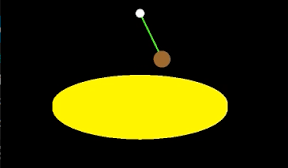

ボールをつり下げてぐるぐるするiPhoneアプリのサンプルコードを描いてみます。
import UIKit
import SceneKit
class ViewController: UIViewController {
weak var scene : SCNScene?
override func viewDidLoad() {
super.viewDidLoad()
self.view.backgroundColor = UIColor.brownColor()
self.setupScene()
self.createBall()
self.createCamera()
}
func setupScene() {
let w = CGRectGetMaxX(self.view.bounds)
let sv = SCNView(frame: CGRect(x: 0, y: 0, width: w, height: w))
sv.scene = SCNScene()
sv.backgroundColor = UIColor.blackColor()
self.view.addSubview(sv)
self.scene = sv.scene
}
func createBall() {
let plate = SCNCylinder(radius: 20, height: 1)
plate.firstMaterial?.diffuse.contents = UIColor.yellowColor()
let plateNode = SCNNode(geometry: plate)
plateNode.position = SCNVector3(x: 0, y: –10, z: 0)
self.scene?.rootNode.addChildNode(plateNode)
let anc = SCNSphere(radius: 1)
anc.firstMaterial?.diffuse.contents = UIColor.whiteColor()
let ancNode = SCNNode(geometry: anc)
ancNode.position = SCNVector3(x: 0, y: 10, z: 0)
self.scene?.rootNode.addChildNode(ancNode)
let ball = SCNSphere(radius: 2)
ball.firstMaterial?.diffuse.contents = UIColor.brownColor()
let ballNode = SCNNode(geometry: ball)
ballNode.name = “ball”
ballNode.position = SCNVector3(x: 0, y: –5, z: 0)
self.scene?.rootNode.addChildNode(ballNode)
ballNode.physicsBody = SCNPhysicsBody.dynamicBody()
ballNode.physicsBody?.categoryBitMask = 0x1 << 1;
ballNode.physicsBody?.collisionBitMask = 0x1 << 2;
let rope = SCNCylinder(radius: 0.2, height: 10)
rope.firstMaterial?.diffuse.contents = UIColor.greenColor()
let ropeNode = SCNNode(geometry: rope)
ropeNode.position = SCNVector3(x: 0, y: 5, z: 0)
self.scene?.rootNode.addChildNode(ropeNode)
ropeNode.physicsBody = SCNPhysicsBody.dynamicBody()
ropeNode.physicsBody?.categoryBitMask = 0x1 << 2;
ropeNode.physicsBody?.collisionBitMask = 0x1 << 1;
let j1 = SCNPhysicsBallSocketJoint(body: ropeNode.physicsBody, anchor: SCNVector3(x: 0, y: 5, z: 0))
self.scene?.physicsWorld.addBehavior(j1)
let j2 = SCNPhysicsBallSocketJoint(bodyA: ropeNode.physicsBody, anchorA: SCNVector3(x: 0, y: –5, z: 0), bodyB: ballNode.physicsBody, anchorB: SCNVector3(x: 0, y: 2, z: 0))
self.scene?.physicsWorld.addBehavior(j2)
}
func createCamera() {
let camera = SCNNode()
camera.camera = SCNCamera()
camera.position = SCNVector3(x: 0, y: 10, z: 60)
camera.rotation = SCNVector4(x: 1, y: 0, z: 0, w: –0.1)
self.scene?.rootNode.addChildNode(camera)
}
var cnt = 0
override func touchesBegan(touches: NSSet, withEvent event: UIEvent) {
let ball = self.scene?.rootNode.childNodeWithName(“ball”, recursively: false)
if (cnt % 2 == 0) {
ball?.physicsBody?.applyForce(SCNVector3(x: 20, y: 0, z: 0), impulse: true)
} else {
ball?.physicsBody?.applyForce(SCNVector3(x: 0, y: 0, z: 20), impulse: true)
}
++cnt
}
}