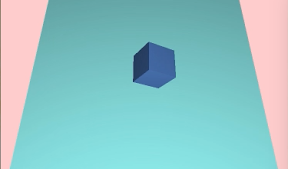

立方体を上下左右にころがすiPhoneアプリのサンプルコードを描いてみます。
import UIKit
import SceneKit
import SpriteKit
class ViewController: UIViewController {
weak var sceneView : SCNView?
override func viewDidLoad() {
super.viewDidLoad()
self.view.backgroundColor = UIColor(hue: 0.1, saturation: 0.3, brightness: 1, alpha: 1)
self.setupScene()
self.createBoard()
self.createCube()
self.createCamera()
self.createLight()
self.sceneView?.overlaySKScene = SKScene(size: self.sceneView!.frame.size)
}
func setupScene() {
let w = CGRectGetMaxX(self.view.bounds)
let sv = SCNView(frame: CGRect(x: 0, y: 0, width: w, height: w))
sv.backgroundColor = UIColor(hue: 0, saturation: 0.2, brightness: 1, alpha: 1)
sv.scene = SCNScene()
self.view.addSubview(sv)
self.sceneView = sv
}
func createBoard() {
let box = SCNBox(width: 40, height: 1, length: 40, chamferRadius: 0)
box.firstMaterial?.diffuse.contents = UIColor(hue: 0.5, saturation: 0.4, brightness: 1, alpha: 1)
let boxNode = SCNNode(geometry: box)
boxNode.physicsBody = SCNPhysicsBody.staticBody()
boxNode.physicsBody?.friction = 1.0
boxNode.physicsBody?.restitution = 0
self.sceneView?.scene?.rootNode.addChildNode(boxNode)
}
func createCube() {
let cube = SCNBox(width: 5, height: 5, length: 5, chamferRadius: 0)
cube.firstMaterial?.diffuse.contents = UIColor(hue: 0.6, saturation: 0.6, brightness: 1, alpha: 1)
let cubeNode = SCNNode(geometry: cube)
cubeNode.name = “cube”
cubeNode.position = SCNVector3(x: 0, y: 5, z: 0)
cubeNode.physicsBody = SCNPhysicsBody.dynamicBody()
cubeNode.physicsBody?.friction = 1.0
cubeNode.physicsBody?.restitution = 0
self.sceneView?.scene?.rootNode.addChildNode(cubeNode)
}
func createCamera() {
let camera = SCNNode()
camera.camera = SCNCamera()
camera.position = SCNVector3(x: 0, y: 40, z: 20)
camera.rotation = SCNVector4(x: 1, y: 0, z: 0, w: Float(-M_PI) * 0.35)
self.sceneView?.scene?.rootNode.addChildNode(camera)
}
func createLight() {
let light = SCNLight()
light.type = SCNLightTypeOmni
let lightNode = SCNNode()
lightNode.light = light
lightNode.position = SCNVector3(x: 0, y: 50, z: 40)
self.sceneView?.scene?.rootNode.addChildNode(lightNode)
}
override func touchesBegan(touches: NSSet, withEvent event: UIEvent) {
let touchp = touches.anyObject()!.locationInNode(self.sceneView?.overlaySKScene)
var isbtn = 0
self.sceneView?.overlaySKScene.enumerateChildNodesWithName(“btn[0-3]”, usingBlock: { (n , b) in
if n.containsPoint(touchp) { isbtn = n.name!.substringFromIndex(advance(n.name!.startIndex,3)).toInt()! }
n.removeFromParent()
})
if let cube = self.sceneView?.scene?.rootNode.childNodeWithName(“cube”, recursively: false) {
let p0 = cube.position
let dx = 2.5 * cos(Float(M_PI) / 2.0 * Float(isbtn))
let dz = 2.5 * sin(Float(M_PI) / 2.0 * Float(isbtn))
var p1 = SCNVector3(x: p0.x – dx, y: p0.y – 2.5, z: p0.z – dz)
p1 = cube.convertPosition(p1, fromNode: self.sceneView?.scene?.rootNode)
var p2 = SCNVector3(x: p0.x + dx, y: p0.y – 2.5, z: p0.z + dz)
p2 = cube.convertPosition(p2, fromNode: self.sceneView?.scene?.rootNode)
cube.physicsBody?.applyForce(SCNVector3(x: 0, y: 5, z: 0), atPosition: p1, impulse: true)
cube.physicsBody?.applyForce(SCNVector3(x: 0, y: –20, z: 0), atPosition: p2, impulse: true)
}
dispatch_after(dispatch_time(DISPATCH_TIME_NOW, 2000 * 1000 * 1000), dispatch_get_main_queue()) {
if let cube = self.sceneView?.scene?.rootNode.childNodeWithName(“cube”, recursively: false) {
for i in 0..<4 {
let btn = SKSpriteNode(color: UIColor(hue: 0, saturation: 0.8, brightness: 1, alpha: 0.8), size: CGSize(width: 20, height: 20))
btn.name = “btn\(i)“
let p = self.sceneView!.projectPoint(cube.presentationNode().position)
let x = 40 * cos(Float(i) * Float(M_PI) / 2.0) + p.x
let y = 40 * sin(Float(i) * Float(M_PI) / 2.0) + p.y
btn.position = CGPoint(x:CGFloat(x), y:CGRectGetMaxY(self.sceneView!.bounds) – CGFloat(y))
self.sceneView?.overlaySKScene.addChild(btn)
}
}
}
}
}