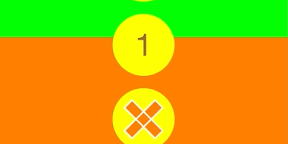

ポチッとするとボタンがピヨッとスライドしながら出てくるiPhoneアプリのサンプルコードを描いてみます。
import UIKit
import SpriteKit
class ViewController: UIViewController {
override func viewDidLoad() {
super.viewDidLoad()
self.view.backgroundColor = UIColor.orangeColor()
let btn = SlidingButton(frame: CGRect(x: 0, y: 0, width: 80, height: 80))
btn.backgroundColor = UIColor.yellowColor()
btn.center = CGPoint(x: CGRectGetMidX(self.view.bounds), y: CGRectGetMaxY(self.view.bounds) – 80)
self.view.addSubview(btn)
btn.buttons[0].addTarget(self, action: “changeBlue”, forControlEvents: .TouchUpInside)
btn.buttons[1].addTarget(self, action: “changeRed”, forControlEvents: .TouchUpInside)
btn.buttons[2].addTarget(self, action: “changeGreen”, forControlEvents: .TouchUpInside)
}
func changeBlue (){
self.changeScreen(.blueColor())
}
func changeRed () {
self.changeScreen(.redColor())
}
func changeGreen() {
self.changeScreen(.greenColor())
}
func changeScreen(color : UIColor) {
let view = UIView(frame: self.view.bounds)
let o = view.center
view.center = CGPoint(x: CGRectGetMidX(self.view.bounds), y: -CGRectGetMaxY(self.view.bounds))
view.backgroundColor = color
self.view.insertSubview(view, atIndex: self.view.subviews.count – 2)
UIView.animateWithDuration(0.5, animations: {
view.center = o
})
}
class SlidingButton : UIControl {
var closed = true
weak var cover : UIView?
var buttons = [UIControl]()
override init (frame : CGRect) {
super.init(frame : frame)
self.addObserver(self, forKeyPath: “backgroundColor”, options: .New | .Initial, context: nil)
self.layer.cornerRadius = CGRectGetMidX(self.bounds)
self.setMainButton()
self.createButtons();
}
deinit{
self.removeObserver(self, forKeyPath: “backgroundColor”)
}
func setMainButton() {
let cover = UIView(frame: self.bounds)
cover.layer.cornerRadius = CGRectGetMidX(self.bounds)
self.addSubview(cover)
self.cover = cover
let l1 = CGRectGetMaxX(self.bounds) * 0.7
let l2 = l1 * 0.25
let rect = CGRect(x: –l1 * 0.5, y: –l2 * 0.5, width: l1, height: l2)
let path = UIBezierPath(rect: rect)
path.applyTransform(CGAffineTransformMakeRotation(CGFloat(M_PI/2.0)))
path.appendPath(UIBezierPath(rect:rect))
let mark = CAShapeLayer()
mark.fillColor = UIColor.orangeColor().CGColor
mark.lineWidth = 2
mark.strokeColor = UIColor.whiteColor().CGColor
mark.path = path.CGPath
mark.position = CGPoint(x: CGRectGetMidX(self.bounds), y: CGRectGetMidY(self.bounds))
cover.layer.addSublayer(mark)
}
func createButtons() {
for i in 0..<3 {
let btn = UIControl(frame: self.bounds)
btn.layer.cornerRadius = CGRectGetMidX(btn.bounds)
btn.backgroundColor = UIColor.yellowColor()
let title = UILabel()
title.text = “\(i + 1)“
title.textColor = UIColor.brownColor()
title.font = UIFont.systemFontOfSize(CGRectGetMaxX(self.bounds) * 0.5)
title.sizeToFit()
title.center = CGPoint(x: CGRectGetMidX(btn.bounds), y: CGRectGetMidY(btn.bounds))
btn.addSubview(title)
self.buttons.append(btn)
self.insertSubview(btn, atIndex: 0)
}
}
override func touchesBegan(touches: NSSet, withEvent event: UIEvent) {
self.closed = !self.closed
let anim = CABasicAnimation(keyPath: “transform.rotation.z”)
anim.toValue = self.closed ? 0 : 3.0 * M_PI/4.0
anim.duration = 0.3
anim.fillMode = kCAFillModeForwards;
anim.removedOnCompletion = false;
self.cover!.layer.addAnimation(anim, forKey: nil)
for (idx, btn) in enumerate(self.buttons) {
UIView.animateWithDuration(0.3, delay: 0.1, options: .CurveEaseInOut, animations: {
btn.center = self.closed ?
CGPoint(x: btn.center.x, y: btn.center.y + CGFloat(idx + 1) * CGRectGetMaxX(btn.bounds) * 1.2)
: CGPoint(x: btn.center.x, y: btn.center.y – CGFloat(idx + 1) * CGRectGetMaxX(btn.bounds) * 1.2)
}, completion:nil)
}
}
override func hitTest(point: CGPoint, withEvent event: UIEvent?) -> UIView? {
let p = self.convertPoint(point, fromView:self);
if CGRectContainsPoint(self.cover!.frame, p) {
return self.cover
}
for btn in self.buttons {
if CGRectContainsPoint(btn.frame, p) {
return btn
}
}
return super.hitTest(point, withEvent: event)
}
override func observeValueForKeyPath(keyPath: String, ofObject object: AnyObject, change: [NSObject : AnyObject], context: UnsafeMutablePointer<Void>) {
if let cover = self.cover {
cover.backgroundColor = change[NSKeyValueChangeNewKey] as UIColor?
}
}
required init(coder aDecoder: NSCoder) {
super.init(coder: aDecoder)
}
}
}