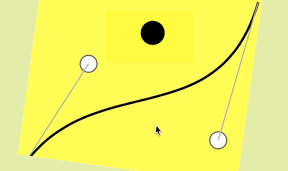

曲線でボールの跳ねる速度をコントロールするiPhoneアプリのサンプルコードを書いてみます。
#import “ViewController.h”
@interface ViewController ()
@property (nonatomic, weak) UIView *ball;
@property (nonatomic, weak) UIView *curveView;
@property (nonatomic, weak) CAShapeLayer *curveline;
@property (nonatomic, weak) CALayer *selected;
@end
@implementation ViewController
– (void)viewDidLoad {
[super viewDidLoad];
self.view.backgroundColor = [UIColor yellowColor];
[self createBall];
[self createBoard];
}
– (void)createBall {
UIView *ball = [[UIView alloc] initWithFrame:CGRectMake(0, 0, 40, 40)];
ball.backgroundColor = [UIColor blackColor];
ball.center = CGPointMake(CGRectGetMidX(self.view.bounds), CGRectGetMaxY(self.view.bounds) * 0.2);
ball.layer.cornerRadius = 20;
[self.view addSubview:ball];
self.ball = ball;
UIBezierPath *path = [UIBezierPath bezierPath];
[path moveToPoint:ball.center];
[path addLineToPoint:CGPointMake(ball.center.x, ball.center.y + 100)];
[path addLineToPoint:CGPointMake(ball.center.x, ball.center.y)];
CAKeyframeAnimation *anim = [CAKeyframeAnimation animationWithKeyPath:@”position”];
anim.path = path.CGPath;
anim.duration = 1.0;
[ball.layer addAnimation:anim forKey:nil];
}
– (void)createBoard {
UIView *curveView = [[UIView alloc] initWithFrame:CGRectMake(0, CGRectGetMidY(self.view.bounds), CGRectGetMaxX(self.view.bounds), CGRectGetMidY(self.view.bounds))];
curveView.backgroundColor = [[UIColor whiteColor] colorWithAlphaComponent:0.2];
[self.view addSubview:curveView];
curveView.userInteractionEnabled = YES;
self.curveView = curveView;
CAShapeLayer *s = [CAShapeLayer layer];
s.fillColor = [UIColor clearColor].CGColor;
s.lineWidth = 4;
s.strokeColor = [UIColor blackColor].CGColor;
[curveView.layer addSublayer:s];
self.curveline = s;
// cp
CGPoint cp[] = {CGPointMake(100, 150), CGPointMake(200, 80)};
for (int i=0; i<2; i++) {
CALayer *slider = [CALayer layer];
slider.name = [NSString stringWithFormat:@”slider%d”, i];
slider.frame = CGRectMake(0, 0, 30, 30);
slider.backgroundColor = [UIColor whiteColor].CGColor;
slider.position = cp[i];
slider.cornerRadius = 15;
slider.borderWidth = 2;
slider.borderColor = [UIColor darkGrayColor].CGColor;
[curveView.layer addSublayer:slider];
}
[self updateCurve];
}
– (void)updateCurve {
CGPoint cp1;
CGPoint cp2;
for (CALayer *l in self.curveView.layer.sublayers) {
if ([l.name isEqual:@”slider0″]) cp1 = l.position;
if ([l.name isEqual:@”slider1″]) cp2 = l.position;
}
UIBezierPath *path = [UIBezierPath bezierPath];
[path moveToPoint:CGPointMake(10, CGRectGetMaxY(self.curveView.bounds) + 10)];
[path addCurveToPoint:CGPointMake(CGRectGetMaxX(self.curveView.bounds) – 10, 10) controlPoint1:cp1 controlPoint2:cp2];
self.curveline.path = path.CGPath;
// update guide line
for (CAShapeLayer *l in self.curveView.layer.sublayers) {
if ([l.name isEqual:@”guide”]) {
[l removeFromSuperlayer];
}
}
UIBezierPath *guidepath = [UIBezierPath bezierPath];
[guidepath moveToPoint:CGPointMake(10, CGRectGetMaxY(self.curveView.bounds) + 10)];
[guidepath addLineToPoint:cp1];
[guidepath moveToPoint:CGPointMake(CGRectGetMaxX(self.curveView.bounds) – 10, 10)];
[guidepath addLineToPoint:cp2];
CAShapeLayer *guide = [CAShapeLayer layer];
guide.path = guidepath.CGPath;
guide.name = @”guide”;
guide.fillColor = [UIColor clearColor].CGColor;
guide.strokeColor = [UIColor lightGrayColor].CGColor;
guide.lineWidth = 2;
[self.curveView.layer addSublayer:guide];
}
– (void)bounce {
CGPoint cp1;
CGPoint cp2;
for (CALayer *l in self.curveView.layer.sublayers) {
if ([l.name isEqual:@”slider0″]) cp1 = l.position;
if ([l.name isEqual:@”slider1″]) cp2 = l.position;
}
UIBezierPath *path = [UIBezierPath bezierPath];
[path moveToPoint:self.ball.center];
[path addLineToPoint:CGPointMake(self.ball.center.x, self.ball.center.y + 100)];
[path addLineToPoint:CGPointMake(self.ball.center.x, self.ball.center.y)];
CAKeyframeAnimation *anim = [CAKeyframeAnimation animationWithKeyPath:@”position”];
anim.path = path.CGPath;
anim.duration = 0.8;
float w = CGRectGetMaxX(self.curveView.bounds);
float h = CGRectGetMaxY(self.curveView.bounds);
anim.timingFunction = [CAMediaTimingFunction functionWithControlPoints:cp1.x/w :1.0-cp1.y/h :cp2.x/w :1.0-cp2.y/h];
anim.removedOnCompletion = NO;
anim.fillMode = kCAFillModeForwards;
[self.ball.layer addAnimation:anim forKey:nil];
}
– (void)touchesBegan:(NSSet *)touches withEvent:(UIEvent *)event
{
CGPoint p = [[touches anyObject] locationInView:self.curveView];
p = [self.curveView convertPoint:p toView:nil]; // get layer point
CALayer *hit = [self.curveView.layer hitTest:p];
if ([hit.name hasPrefix:@”slider”]) {
self.selected = hit;
} else {
[self bounce];
}
}
– (void)touchesMoved:(NSSet *)touches withEvent:(UIEvent *)event
{
CGPoint p = [[touches anyObject] locationInView:self.curveView];
[CATransaction begin];
[CATransaction setValue:(id)kCFBooleanTrue forKey:kCATransactionDisableActions];
self.selected.position = p;
[self updateCurve];
[CATransaction commit];
}
– (void)touchesEnded:(NSSet *)touches withEvent:(UIEvent *)event
{
self.selected = nil;
}
@end