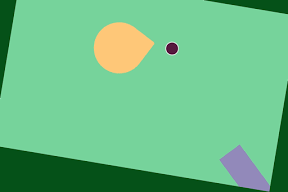

ボールを当てて回転させるiPhoneアプリのサンプルコードを描いてみます。
import UIKit
import SpriteKit
class ViewController: UIViewController {
weak var scene : SKScene?
override func viewDidLoad() {
super.viewDidLoad()
setupScene()
createSpinner()
createLauncher()
}
func setupScene() {
let sv = SKView(frame: view.bounds)
let s = SKScene(size: sv.frame.size)
s.backgroundColor = UIColor(hue: 0.4, saturation: 0.5, brightness: 0.8, alpha: 1)
sv.presentScene(s)
view.addSubview(sv)
self.scene = s
}
func createSpinner() {
let spinner = SKNode()
spinner.position = CGPoint(x: CGRectGetMidX(view.bounds), y: CGRectGetMidY(view.bounds))
self.scene?.addChild(spinner)
let partA = SKShapeNode(circleOfRadius: 40)
partA.fillColor = UIColor(hue: 0.1, saturation: 0.6, brightness: 1, alpha: 1)
partA.lineWidth = 0
spinner.addChild(partA)
let partB = SKShapeNode(rect: CGRect(x: –40, y: –40, width: 42, height: 42), cornerRadius: 3)
partB.fillColor = UIColor(hue: 0.1, saturation: 0.6, brightness: 1, alpha: 1)
partB.lineWidth = 0
spinner.addChild(partB)
spinner.physicsBody = SKPhysicsBody(bodies: [SKPhysicsBody(circleOfRadius: 40), SKPhysicsBody(rectangleOfSize: CGSize(width: 40, height: 40), center: CGPoint(x: –20, y: –20))])
spinner.physicsBody?.dynamic = true
spinner.physicsBody?.pinned = true
}
func createLauncher() {
let launcher = SKSpriteNode(color: UIColor(hue: 0.7, saturation: 0.3, brightness: 0.7, alpha: 1), size: CGSize(width: 100, height: 40))
launcher.name = “launcher”
launcher.position = CGPoint(x: 20, y: 100)
launcher.zRotation = 0.8
self.scene?.addChild(launcher)
}
override func touchesBegan(touches: NSSet, withEvent event: UIEvent) {
let launcher = self.scene?.childNodeWithName(“launcher”)
let ball = SKShapeNode(circleOfRadius: 10)
ball.fillColor = UIColor(hue: 0.9, saturation: 0.7, brightness: 0.3, alpha: 1)
ball.position = CGPoint(x: 62, y: 142)
self.scene?.addChild(ball)
ball.physicsBody = SKPhysicsBody(circleOfRadius: 10)
ball.physicsBody?.applyImpulse(CGVector(dx: 10, dy: 12))
ball.runAction(SKAction.sequence([SKAction.waitForDuration(1.5), SKAction.runBlock { ball.removeFromParent() }]))
}
}