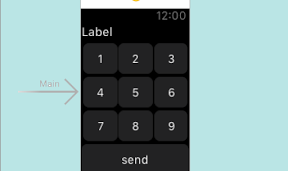

WatchKitのボタンを使って数字入力を試してみる。ポケベル的な。。
――――― [InterfaceController.swift] ――――――――――
import WatchKit
import Foundation
class InterfaceController: WKInterfaceController {
@IBOutlet weak var label: WKInterfaceLabel!
var text = “”
@IBAction func push1() {
text = text + “1”
self.label.setText(text)
}
@IBAction func push2() {
text = text + “2”
self.label.setText(text)
}
@IBAction func push3() {
text = text + “3”
self.label.setText(text)
}
@IBAction func push4() {
text = text + “4”
self.label.setText(text)
}
@IBAction func push5() {
text = text + “5”
self.label.setText(text)
}
@IBAction func push6() {
text = text + “6”
self.label.setText(text)
}
@IBAction func push7() {
text = text + “7”
self.label.setText(text)
}
@IBAction func push8() {
text = text + “8”
self.label.setText(text)
}
@IBAction func push9() {
text = text + “9”
self.label.setText(text)
}
@IBAction func messageToPhone() {
WKInterfaceController.openParentApplication([“Message” : text], reply: { (res, err) -> Void in
self.label.setText(“\(res)”)
self.text = “”
})
}
}
――――― [AppDelegate.swift] ――――――――――
import UIKit
@UIApplicationMain
class AppDelegate: UIResponder, UIApplicationDelegate {
var window: UIWindow?
func application(application: UIApplication, handleWatchKitExtensionRequest userInfo: [NSObject : AnyObject]?, reply: (([NSObject : AnyObject]!) -> Void)!) {
UIAlertView(title: “Message From Watch”, message: “\(userInfo!)”, delegate: nil, cancelButtonTitle: “OK”).show()
reply([“Response”:“Hey!”]);
}
}