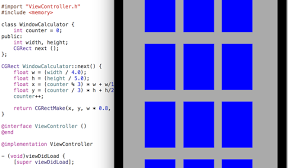

一部C++のコードを混ぜて、ビルを表示するiPhoneアプリのサンプルコードを描いてみます。
#import “ViewController.h”
#include <memory>
class WindowCalculator {
int counter = 0;
public:
int width, height;
CGRect next ();
};
CGRect WindowCalculator::next() {
float w = (width / 4.0);
float h = (height / 5.0);
float x = (counter % 3) * w + w/1.8;
float y = (counter / 3) * h + h/2.0;
counter++;
return CGRectMake(x, y, w * 0.8, h * 0.8);
}
@interface ViewController ()
@end
@implementation ViewController
– (void)viewDidLoad {
[super viewDidLoad];
self.view.backgroundColor = [UIColor blackColor];
float w = CGRectGetMaxX(self.view.bounds) – 40;
float h = CGRectGetMaxY(self.view.bounds) – 40;
UIView *building = [[UIView alloc] initWithFrame:CGRectMake(20, 20, w, h)];
building.backgroundColor = [UIColor lightGrayColor];
[self.view addSubview:building];
std::shared_ptr<WindowCalculator> cppClass(new WindowCalculator());
cppClass->width = w;
cppClass->height = h;
for (int i=0; i<12; i++) {
CGRect rect = cppClass->next();
UIView *window = [[UIView alloc] initWithFrame:rect];
window.backgroundColor = [UIColor blueColor];
[building addSubview:window];
}
}
@end