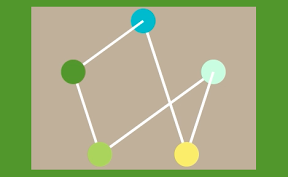

隣接リストを使ってグラフの情報を持ってみるiPhoneアプリのサンプルコードを描いてみます。
#import “ViewController.h”
#include <vector>
using namespace std;
struct node {
vector<node*> edge;
int tag;
int color;
};
typedef struct {
float x;
float y;
} MyPoint;
@interface ViewController () {
node nodes[10];
}
@property (nonatomic, strong) UIView *last;
@end
@implementation ViewController
#define ColorHex(rgb) [UIColor colorWithRed:((rgb & 0xFF0000) >> 16)/255.0 green:((rgb & 0xFF00) >> 8)/255.0 blue:(rgb & 0xFF)/255.0 alpha:1.0]
– (void)viewDidLoad {
[super viewDidLoad];
self.view.backgroundColor = [UIColor colorWithHue:0.1 saturation:0.2 brightness:0.7 alpha:1];
[self updateNodes];
}
– (MyPoint)pointAt:(int)i {
float dw = 2.0 * M_PI / 5.0;
float r = 120;
float w = i * dw – M_PI / 2.0;
float x = r * cos(w) + CGRectGetMidX(self.view.bounds);
float y = r * sin(w) + 300;
return {.x=x, .y=y};
}
– (void)updateNodes {
[self.view.subviews enumerateObjectsUsingBlock:^(UIView *v, NSUInteger idx, BOOL *stop) {
[v removeFromSuperview];
}];
for (int i=0; i<5; i++) {
UIView *n = [[UIView alloc] initWithFrame:CGRectMake(0, 0, 40, 40)];
n.tag = i;
if (nodes[i].color > 0) {
n.backgroundColor = ColorHex(nodes[i].color);
if (nodes[i].edge.size() > 0) {
MyPoint p0 = [self pointAt:i];
node n1 = *nodes[i].edge[0];
MyPoint p1 = [self pointAt:n1.tag];
UIBezierPath *path = [UIBezierPath bezierPath];
[path moveToPoint:CGPointMake(p0.x, p0.y)];
[path addLineToPoint:CGPointMake(p1.x, p1.y)];
CAShapeLayer *l = [CAShapeLayer layer];
l.path = path.CGPath;
l.fillColor = [UIColor clearColor].CGColor;
l.strokeColor = [UIColor whiteColor].CGColor;
l.lineWidth = 4;
[self.view.layer addSublayer:l];
}
} else {
n.backgroundColor = [UIColor blackColor];
}
n.layer.cornerRadius = 20;
MyPoint p = [self pointAt:i];
n.center = CGPointMake(p.x, p.y);
[self.view addSubview:n];
}
}
– (void)touchesBegan:(NSSet *)touches withEvent:(UIEvent *)event {
CGPoint p = [[touches anyObject] locationInView:self.view];
UIView *t = [self.view hitTest:p withEvent:nil];
int colors[] = {0x04BFBF, 0xCAFCD8, 0xF7E967, 0xA9CF54, 0x588F27};
int tag = (int)t.tag;
nodes[t.tag].color = colors[tag];
nodes[t.tag].tag = tag;
if (self.last) {
nodes[self.last.tag].edge.push_back(&nodes[t.tag]);
}
[self updateNodes];
self.last = [self.view viewWithTag:tag];
}
@end