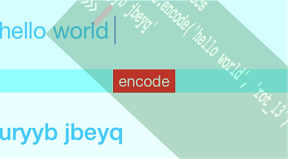

カエサル暗号の13文字シフト(rot_13)をpythonだと簡単にかけるというのを見たのでそれっぽいのを試せるiPhoneアプリ(C++)のサンプルコードを描いてみます。
#import “ViewController.h”
#include <memory>
#include <string>
using namespace::std;
class Rot13Encoder {
public:
NSString* encode(NSString*);
};
NSString* Rot13Encoder::encode(NSString* str) {
const char *s0 = [str UTF8String];
char s[str.length];
strcpy(s, s0);
for( int i=0; i<str.length; i++ ){
// lower case only
if (s[i] < ‘a’ || s[i] > ‘z’) continue;
if(s[i] >= ‘a’ && s[i] <= ‘m’) s[i] += 13;
else s[i] -= 13;
}
return [NSString stringWithUTF8String:s];
};
@interface ViewController ()
@property (nonatomic, weak) UITextField *textField;
@property (nonatomic, weak) UILabel *encodedText;
@end
@implementation ViewController
– (void)viewDidLoad {
[super viewDidLoad];
self.view.backgroundColor = [UIColor colorWithHue:0.5 saturation:0.5 brightness:1 alpha:1];
UITextField *tf = [[UITextField alloc] initWithFrame:CGRectMake(0, 80, CGRectGetMaxX(self.view.bounds), 100)];
tf.backgroundColor = [UIColor colorWithHue:0.5 saturation:0.2 brightness:1 alpha:1];
tf.font = [UIFont systemFontOfSize:30];
tf.textColor = [UIColor colorWithHue:0.55 saturation:0.8 brightness:1 alpha:1];
[self.view addSubview:tf];
self.textField = tf;
UIButton *btn = [UIButton buttonWithType:UIButtonTypeCustom];
btn.frame = CGRectMake(CGRectGetMidX(self.view.bounds) – 40, 180, 80, 30);
btn.backgroundColor = [UIColor redColor];
btn.titleLabel.font = [UIFont systemFontOfSize:20];
btn.titleLabel.textColor = [UIColor whiteColor];
[btn setTitle:@”encode” forState:UIControlStateNormal];
[self.view addSubview:btn];
[btn addTarget:self action:@selector(tapEncodeBtn:) forControlEvents:UIControlEventTouchUpInside];
UILabel *el = [[UILabel alloc] initWithFrame:CGRectMake(0, 210, CGRectGetMaxX(self.view.bounds), 100)];
el.backgroundColor = [UIColor colorWithHue:0.5 saturation:0.1 brightness:1 alpha:1];
el.font = [UIFont boldSystemFontOfSize:30];
el.textColor = [UIColor colorWithHue:0.55 saturation:0.8 brightness:1 alpha:1];
[self.view addSubview:el];
self.encodedText = el;
}
– (void)tapEncodeBtn:(UIButton*)sender {
shared_ptr<Rot13Encoder> cppClass(new Rot13Encoder());
NSString *encoded = cppClass->encode(self.textField.text);
[UIView animateWithDuration:0.1 animations:^{
sender.transform = CGAffineTransformMakeScale(1.1, 1.1);
} completion:^(BOOL finished) {
[UIView animateWithDuration:0.1 animations:^{
self.encodedText.text = encoded;
sender.transform = CGAffineTransformIdentity;
}];
}];
}
@end