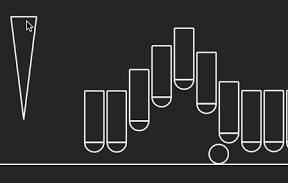

ボールを転がして棒をポンポン弾ませるiPhoneアプリのサンプルコードを描いてみます。
#import “ViewController.h”
#import <SpriteKit/SpriteKit.h>
@interface PonScene : SKScene
@end
@implementation PonScene
– (void)didMoveToView:(SKView *)view
{
[self createFloor];
[self createPonBars];
[self createBall];
[self createForceLevelBar];
}
– (void)createFloor
{
SKSpriteNode *floor = [SKSpriteNode spriteNodeWithColor:[SKColor whiteColor] size:CGSizeMake(CGRectGetMaxX(self.frame), 2)];
floor.name = @”floor”;
floor.position = CGPointMake(CGRectGetMidX(self.frame), 30);
[self addChild:floor];
floor.physicsBody = [SKPhysicsBody bodyWithRectangleOfSize:floor.size];
floor.physicsBody.dynamic = NO;
}
– (void)createPonBars
{
SKNode *floor = [self childNodeWithName:@”floor”];
for (int i=0; i<10; i++) {
float x = 35 * i + 150;
float y = 105;
SKNode *ponBar = [SKNode node];
ponBar.position = CGPointMake(x, y);
[self addChild:ponBar];
UIBezierPath *barPath = [UIBezierPath bezierPathWithRect:CGRectMake(-15, –40, 30, 80)];
SKShapeNode *bar = [SKShapeNode node];
bar.path = barPath.CGPath;
[ponBar addChild:bar];
UIBezierPath *circlePath = [UIBezierPath bezierPathWithArcCenter:CGPointMake(0, –40) radius:15 startAngle:0 endAngle:M_PI clockwise:NO];
[circlePath closePath];
SKShapeNode *circle = [SKShapeNode node];
circle.path = circlePath.CGPath;
[ponBar addChild:circle];
ponBar.physicsBody = [SKPhysicsBody bodyWithPolygonFromPath:circlePath.CGPath];
ponBar.physicsBody.density = 0.1;
SKPhysicsJointSliding *s = [SKPhysicsJointSliding jointWithBodyA:ponBar.physicsBody bodyB:floor.physicsBody anchor:ponBar.position axis:CGVectorMake(0, 1)];
[self.physicsWorld addJoint:s];
s.shouldEnableLimits = YES;
s.upperDistanceLimit = 0;
s.lowerDistanceLimit = –100;
}
}
– (void)createBall
{
UIBezierPath *path = [UIBezierPath bezierPathWithArcCenter:CGPointZero radius:15 startAngle:0 endAngle:2*M_PI clockwise:YES];
SKShapeNode *ball = [SKShapeNode node];
ball.name = @”ball”;
ball.path = path.CGPath;
ball.position = CGPointMake(40, 50);
[self addChild:ball];
ball.physicsBody = [SKPhysicsBody bodyWithCircleOfRadius:15];
}
– (void)createForceLevelBar
{
UIBezierPath *path = [UIBezierPath bezierPath];
[path moveToPoint:CGPointMake(-20, 80)];
[path addLineToPoint:CGPointMake(0, –80)];
[path addLineToPoint:CGPointMake(20, 80)];
[path closePath];
SKShapeNode *levelbar = [SKShapeNode node];
levelbar.name = @”levelbar”;
levelbar.position = CGPointMake(40, 180);
levelbar.path = path.CGPath;
[self addChild:levelbar];
}
– (void)touchesBegan:(NSSet *)touches withEvent:(UIEvent *)event
{
CGPoint p = [[touches anyObject] locationInNode:self];
SKNode *levelbar = [self childNodeWithName:@”levelbar”];
if ([levelbar containsPoint:p]) {
SKNode *ball = [self childNodeWithName:@”ball”];
[ball.physicsBody applyImpulse:CGVectorMake(pow(p.y / 40, 2) , 0)];
}
}
-(void)didSimulatePhysics
{
SKNode *ball = [self childNodeWithName:@”ball”];
if ((ball.position.x != 40 && fabs(ball.physicsBody.velocity.dx) < 0.1) || ball.position.x > 500) {
[ball removeFromParent];
[self createBall];
}
}
@end
@interface ViewController ()
@end
@implementation ViewController
– (void)viewDidAppear:(BOOL)animated
{
SKView *spriteView = [[SKView alloc] initWithFrame:self.view.bounds];
[self.view addSubview:spriteView];
SKScene *scene = [[PonScene alloc] initWithSize:spriteView.frame.size];
[spriteView presentScene:scene];
}
@end