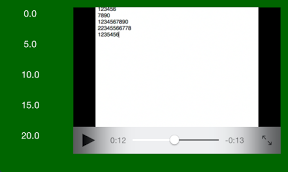

目次をクリックするとそこからビデオの再生をするようなiPhoneアプリのサンプルコードを描いてみます。
#import “ViewController.h”
#import <MediaPlayer/MediaPlayer.h>
@interface ViewController ()
@property (strong) MPMoviePlayerController *player;
@end
@implementation ViewController
@synthesize player;
– (void)viewDidAppear:(BOOL)animated
{
self.view.backgroundColor = [UIColor colorWithRed:0 green:0.4 blue:0 alpha:1.0];
[self createPlayer];
[self tableOfContents];
}
– (void)createPlayer
{
NSString *moviePath = [[NSBundle mainBundle] pathForResource:@”sample” ofType:@”m4v”];
NSURL *movieURL = [NSURL fileURLWithPath:moviePath];
player = [[MPMoviePlayerController alloc] initWithContentURL:movieURL];
if (player)
{
[player setContentURL:movieURL];
[player setMovieSourceType:MPMovieSourceTypeFile];
CGRect rect = CGRectMake(120, 50, 340, 240);
player.view.frame = rect;
player.view.backgroundColor = [UIColor lightGrayColor];
[self.view addSubview: player.view];
[player prepareToPlay];
[player pause];
}
}
– (void)tableOfContents
{
for (int i=0; i<5; i++) {
float x = 50;
float y = i * 50 + 60;
UIButton *b = [UIButton buttonWithType:UIButtonTypeSystem];
[b setTitle:[NSString stringWithFormat:@”%.1f”, 5.0 * i] forState:UIControlStateNormal];
[b setTitleColor:[UIColor whiteColor] forState:UIControlStateNormal];
[b sizeToFit];
[self.view addSubview:b];
b.center = CGPointMake(x, y);
[b addTarget:self action:@selector(playAt:) forControlEvents:UIControlEventTouchUpInside];
}
}
– (void)playAt:(UIButton *)sender
{
[player pause];
player.currentPlaybackTime = [sender.titleLabel.text floatValue];
[player play];
}
@end