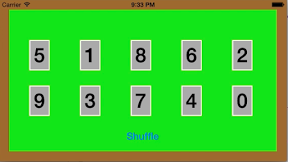

画面上に表示したカードをシャッフルするiPhoneアプリのサンプルコードを描いてみます。
#import “ViewController.h”
@interface ViewController ()
@property (nonatomic, strong) NSMutableArray *cards;
@end
@implementation ViewController
– (void)viewDidAppear:(BOOL)animated
{
self.view.backgroundColor = [UIColor greenColor];
self.view.layer.borderColor = [UIColor brownColor].CGColor;
self.view.layer.borderWidth = 20;
[self createCards];
[self createButton];
}
– (void)createCards
{
self.cards = [NSMutableArray array];
for (int i=0; i<10; i++) {
float x = (i % 5) * 100 + 60;
float y = (i / 5) * 90 + 80;
UILabel *card = [[UILabel alloc] initWithFrame:CGRectMake(x, y, 40, 60)];
card.text = [@(i) stringValue];
card.font = [UIFont boldSystemFontOfSize:40];
card.textAlignment = NSTextAlignmentCenter;
card.layer.borderWidth = 2;
card.layer.borderColor = [UIColor whiteColor].CGColor;
card.backgroundColor = [UIColor lightGrayColor];
[self.view addSubview:card];
[self.cards addObject:card];
}
}
– (void)createButton
{
UIButton *shuffleButton = [UIButton buttonWithType:UIButtonTypeSystem];
shuffleButton.titleLabel.font = [UIFont boldSystemFontOfSize:20];
[shuffleButton setTitle:@”Shuffle” forState:UIControlStateNormal];
[shuffleButton sizeToFit];
shuffleButton.center = CGPointMake(CGRectGetMidX(self.view.bounds), CGRectGetMaxY(self.view.bounds) – 50);
[self.view addSubview:shuffleButton];
[shuffleButton addTarget:self action:@selector(shuffle) forControlEvents:UIControlEventTouchUpInside];
}
– (void)shuffle
{
NSMutableArray *copy = [NSMutableArray array];
for (int i=0; i<self.cards.count; i++) {
UIView *v = self.cards[i];
v.layer.zPosition = arc4random() % 10;
[copy addObject:[NSValue valueWithCGPoint:v.center]];
}
for (int i = 0; i < self.cards.count; i++) {
int n = (arc4random() % self.cards.count – i) + i;
[copy exchangeObjectAtIndex:i withObjectAtIndex:n];
}
for (int i=0; i<self.cards.count; i++) {
UIView *v = self.cards[i];
__block CGPoint op = [copy[i] CGPointValue];
[UIView animateWithDuration:0.5 animations:^{
v.center = CGPointMake(CGRectGetMidX(self.view.bounds), CGRectGetMidY(self.view.bounds));
} completion:^(BOOL finished) {
[UIView animateWithDuration:0.5 animations:^{
v.center = op;
}];
}];
}
}
@end