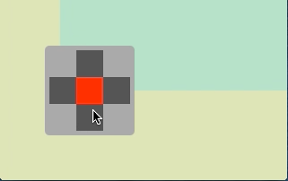

十字キーをポチポチすると画面の背景色がかわるiPhoneアプリのサンプルコードを描いてみます。
#import “ViewController.h”
@interface ViewController ()
@property (nonatomic, weak) UIView *keyView;
@property (nonatomic, weak) UIView *marker;
@property (nonatomic, weak) UIView *back;
@end
@implementation ViewController
– (void)viewDidLoad
{
[super viewDidLoad];
[self createCrossKey];
[self updateLayout];
}
– (void)createCrossKey
{
UIView *keyView = [[UIView alloc] initWithFrame:CGRectMake(0, 0, 100, 100)];
keyView.backgroundColor = [UIColor lightGrayColor];
keyView.layer.cornerRadius = 5;
[self.view addSubview:keyView];
UIView* (^btnView)(CGPoint) = ^(CGPoint p){
UIView *v = [[UIView alloc] initWithFrame:CGRectMake(0, 0, 30, 30)];
v.backgroundColor = [UIColor darkGrayColor];
v.center = p;
return v;
};
float dAngle = M_PI / 2.0;
for (int i=0; i<4; i++) {
float x = 30 * cos(dAngle * i) + 50;
float y = 30 * sin(dAngle * i) + 50;
UIView *btn = btnView(CGPointMake(x, y));
btn.tag = i + 1;
[keyView addSubview:btn];
[btn addGestureRecognizer:[[UITapGestureRecognizer alloc] initWithTarget:self action:@selector(tap:)]];
}
UIView *marker = [[UIView alloc] initWithFrame:CGRectMake(0, 0, 30, 30)];
marker.center = CGPointMake(50, 50);
marker.backgroundColor = [UIColor redColor];
[keyView addSubview:marker];
self.marker = marker;
self.keyView = keyView;
self.keyView.translatesAutoresizingMaskIntoConstraints = NO;
}
– (void)tap:(UITapGestureRecognizer *)sender
{
[UIView animateWithDuration:0.2 animations:^{
self.marker.center = CGPointMake(50, 50);
} completion:^(BOOL finished) {
[UIView animateWithDuration:0.2 animations:^{
self.marker.center = sender.view.center;
}];
}];
CGPoint start = CGPointZero;
switch (sender.view.tag) {
case 2: start = CGPointMake(CGRectGetMaxX(self.view.frame), 0); break;
case 3: start = CGPointMake(CGRectGetMaxX(self.view.frame), CGRectGetMaxY(self.view.frame)); break;
case 4: start = CGPointMake(0, CGRectGetMaxY(self.view.frame)); break;
default:
break;
}
UIView *back = [[UIView alloc] initWithFrame:self.view.bounds];
back.backgroundColor = [UIColor colorWithHue:sender.view.tag * 0.2 saturation:0.2 brightness:0.9 alpha:1];
back.center = start;
[self.view insertSubview:back belowSubview:self.keyView];
[UIView animateWithDuration:0.4 animations:^{
back.center = self.view.center;
} completion:^(BOOL finished) {
[self.back removeFromSuperview];
self.back = back;
}];
}
– (void)updateLayout
{
[self.view addConstraints:[NSLayoutConstraint constraintsWithVisualFormat:@”|-50-[keyView(100)]” options:NSLayoutFormatAlignAllBottom metrics:nil views:@{@”keyView” : self.keyView}]];
[self.view addConstraints:[NSLayoutConstraint constraintsWithVisualFormat:@”V:[keyView(100)]-50-|” options:NSLayoutFormatAlignAllBottom metrics:nil views:@{@”keyView” : self.keyView}]];
}
@end