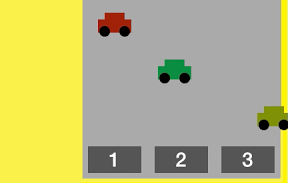

ボタンに書いてある数の車が走ってくる感じで、かず遊びiPhoneアプリのサンプルコードを書いてみます
#import “ViewController.h”
@interface ViewController ()
@property (nonatomic, weak) UIView *mainPanel;
@property (nonatomic, strong) NSMutableArray *cars;
@end
@implementation ViewController
– (void)viewDidLoad
{
[super viewDidLoad];
self.view.backgroundColor = [UIColor yellowColor];
UIView *main = [[UIView alloc] initWithFrame:CGRectMake(0, 0, 300, 300)];
main.backgroundColor = [UIColor lightGrayColor];
main.translatesAutoresizingMaskIntoConstraints = NO;
[self.view addSubview:main];
self.mainPanel = main;
[self.view addConstraints:[NSLayoutConstraint constraintsWithVisualFormat:@”|-10-[panel(300)]” options:0 metrics:nil views:@{@”panel”:main}]];
[self.view addConstraints:[NSLayoutConstraint constraintsWithVisualFormat:@”V:|-50-[panel(300)]” options:0 metrics:nil views:@{@”panel”:main}]];
[self createNumberButtons];
}
– (void)createNumberButtons
{
UIImage *grayImage = [self imageWithColor:[UIColor darkGrayColor]];
for (int i=0; i<3; i++) {
UIButton *btn = [UIButton buttonWithType:UIButtonTypeCustom];
btn.tag = (i + 1);
[btn setBackgroundImage:grayImage forState:UIControlStateNormal];
btn.frame = CGRectMake(i*100 + 10, 250, 80, 40);
btn.titleLabel.font = [UIFont boldSystemFontOfSize:30];
[btn setTitle:[@(i+1) stringValue] forState:UIControlStateNormal];
[self.mainPanel addSubview:btn];
[btn addTarget:self action:@selector(tap:) forControlEvents:UIControlEventTouchUpInside];
}
}
– (void)tap:(UIButton *)sender
{
if (!self.cars) {
self.cars = [NSMutableArray array];
for (int i=0; i<sender.tag; i++) {
UIView *car = [self car];
[self.cars addObject:car];
car.center = CGPointMake(350, 70 * (i + 1));
[UIView animateWithDuration:0.5 delay:0.5 * i options:0 animations:^{
car.center = CGPointMake(i * 90 + 50, car.center.y);
} completion:^(BOOL finished) {
}];
}
} else {
[self.cars enumerateObjectsUsingBlock:^(UIView *car, NSUInteger idx, BOOL *stop) {
[UIView animateWithDuration:0.5 delay:0.5 * idx options:0 animations:^{
if (idx < sender.tag)
car.center = CGPointMake(-100, car.center.y);
else
car.alpha = 0;
} completion:^(BOOL finished) {
[car removeFromSuperview];
self.cars = nil;
}];
}];
}
}
– (UIView *)car
{
UIColor *color = [UIColor colorWithHue:0.2 * (arc4random() % 4) saturation:0.9 brightness:0.6 alpha:1];
UIView *car = [[UIView alloc] initWithFrame:CGRectMake(0, 0, 50, 20)];
car.backgroundColor = color;
[self.mainPanel addSubview:car];
UIView *top = [[UIView alloc] initWithFrame:CGRectMake(10, –10, 30, 10)];
top.backgroundColor = color;
[car addSubview:top];
for (int i=0; i<2; i++) {
UIView *tire = [[UIView alloc] initWithFrame:CGRectMake(i * 30+2, 10, 16, 16)];
tire.backgroundColor = [UIColor blackColor];
tire.layer.cornerRadius = 8;
[car addSubview:tire];
}
return car;
}
– (UIImage *)imageWithColor:(UIColor *)color
{
CGRect rect = CGRectMake(0, 0, 1, 1);
UIGraphicsBeginImageContextWithOptions(rect.size, NO, 0);
[color setFill];
UIRectFill(rect);
UIImage *img = UIGraphicsGetImageFromCurrentImageContext();
UIGraphicsEndImageContext();
return img;
}
@end