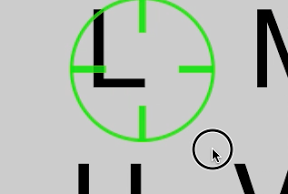

ABC表をスクロールさせて止めたところの文字を入力するiPhoneアプリのサンプルコードを描いてみます。
#import “ViewController.h”
@interface ViewController () <UIScrollViewDelegate>
@property (nonatomic, weak) UIScrollView *scroll;
@property (nonatomic, weak) UIView *scope;
@property (nonatomic, weak) UILabel *display;
@property (nonatomic, strong) NSTimer *timer;
@property (nonatomic) NSInteger counter;
@end
@implementation ViewController
– (void)viewDidLoad
{
[super viewDidLoad];
self.view.backgroundColor = [UIColor blackColor];
[self createABCMap];
[self createScope];
[self createDisplay];
}
#define ABC @“ABCDEFGHIJKLMNOPQRSTUVWXYZ”
– (void)createABCMap
{
UIScrollView *sv = [[UIScrollView alloc] initWithFrame:CGRectMake(0, 0, 320, 400)];
sv.backgroundColor = [[UIColor whiteColor] colorWithAlphaComponent:0.8];
sv.contentSize = CGSizeMake(ABC.length * 180.0 / 3.0 + 100, 180 * 4.0 + 100);
sv.showsHorizontalScrollIndicator = NO;
sv.showsVerticalScrollIndicator = NO;
sv.layer.masksToBounds = NO;
sv.delegate = self;
[self.view addSubview:sv];
for (int i=0; i<ABC.length; i++) {
UILabel *l = [[UILabel alloc] init];
l.userInteractionEnabled = YES;
l.center = CGPointMake((i%9) * 180 + 120, (i/9) * 180 + 120);
l.text = [ABC substringWithRange:NSMakeRange(i, 1)];
l.font = [UIFont systemFontOfSize:120];
[l sizeToFit];
[sv addSubview:l];
}
}
– (void)createScope
{
UIView *scope = [[UIView alloc] initWithFrame:CGRectMake(0, 0, 160, 160)];
scope.userInteractionEnabled = NO;
scope.center = CGPointMake(160, 200);
scope.backgroundColor = [UIColor clearColor];
scope.layer.cornerRadius = 80;
scope.layer.borderWidth = 4;
scope.layer.borderColor = [[UIColor greenColor] colorWithAlphaComponent:0.8].CGColor;
for (int i=0; i<4; i++) {
float x = 60 * cos(M_PI / 2.0 * i) + 80;
float y = 60 * sin(M_PI / 2.0 * i) + 80;
UIView *v = (i%2) ? [[UIView alloc] initWithFrame:CGRectMake(0, 80, 8, 40)] : [[UIView alloc] initWithFrame:CGRectMake(0, 80, 40, 8)];
v.center = CGPointMake(x, y);
v.backgroundColor = [[UIColor greenColor] colorWithAlphaComponent:0.8];
[scope addSubview:v];
}
[self.view addSubview:scope];
self.scope = scope;
}
– (void)createDisplay
{
UILabel *l = [[UILabel alloc] initWithFrame:CGRectMake(20, 420, 280, 40)];
l.layer.cornerRadius = 5;
l.layer.masksToBounds = YES;
l.text = @””;
l.backgroundColor = [UIColor lightGrayColor];
[self.view addSubview:l];
self.display = l;
}
– (void)scrollViewWillEndDragging:(UIScrollView *)scrollView withVelocity:(CGPoint)velocity targetContentOffset:(inout CGPoint *)targetContentOffset
{
if (!self.timer) {
self.timer = [NSTimer scheduledTimerWithTimeInterval:0.5 target:self selector:@selector(flash:) userInfo:nil repeats:YES];
}
}
– (void)scrollViewWillBeginDragging:(UIScrollView *)scrollView
{
[self.timer invalidate];
self.timer = nil;
self.counter = 0;
}
– (void)flash:(NSTimer *)sender
{
self.counter ++;
if (self.counter > 3) {
[sender invalidate];
sender = nil;
self.counter = 0;
[self checkWord];
}
[UIView animateWithDuration:0.3 animations:^{
self.scope.alpha = 0;
} completion:^(BOOL finished) {
self.scope.alpha = 1.0;
}];
}
– (void)checkWord
{
self.scroll.userInteractionEnabled = YES;
UIView *v = [self.view hitTest:self.scope.center withEvent:nil];
if ([v isKindOfClass:[UILabel class]]) {
self.display.text = [NSString stringWithFormat:@”%@%@”, self.display.text, ((UILabel *)v).text];
}
}
@end