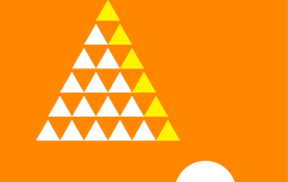

三角がドンドン増えていくiPhoneアプリのサンプルコードを描いてみます。
import UIKit
class ViewController: UIViewController {
var count = 1
let rate : CGFloat = 20.0;
weak var contentView : UIView?
override func viewDidLoad() {
super.viewDidLoad()
self.view.backgroundColor = UIColor.orangeColor()
var v = UIView(frame: CGRectZero)
v.center = CGPointMake(CGRectGetMidX(self.view.bounds)/3.0, CGRectGetMidY(self.view.bounds))
self.view.addSubview(v)
self.contentView = v
var tri = self.createTriangle()
var btn = UIView(frame: CGRectMake(CGRectGetMidX(self.view.bounds) + 40, CGRectGetMidY(self.view.bounds) + 40, 80, 80))
btn.backgroundColor = UIColor.whiteColor()
btn.layer.cornerRadius = 40
self.view.addSubview(btn)
}
func createTriangle() -> CAShapeLayer {
let l = CGRectGetMaxX(self.view.bounds) / 2.0
var path = UIBezierPath(triangleLength: l, center: CGPointZero)
var triangle = CAShapeLayer()
triangle.name = “tri”
triangle.path = path.CGPath
triangle.fillColor = UIColor.yellowColor().CGColor
self.contentView?.layer.addSublayer(triangle)
return triangle
}
override func touchesBegan(touches: NSSet, withEvent event: UIEvent) {
let rate = CGFloat(self.count) / CGFloat(++self.count)
self.contentView!.transform = CGAffineTransformScale(self.contentView!.transform, rate, rate)
let l = CGRectGetMaxX(self.view.bounds) / 2.0
var triangles = self.contentView!.layer.sublayers.filter(){$0.name == “tri”}
for i in 0..<triangles.count {
let item = triangles[i] as CAShapeLayer
item.name = “used tri”
item.fillColor = UIColor.whiteColor().CGColor
if i == 0 {
var triB = self.createTriangle()
triB.position = CGPoint(x: item.position.x + l/2.0, y: item.position.y – l)
}
var triA = self.createTriangle()
triA.position = CGPoint(x: item.position.x + l, y: item.position.y)
}
self.contentView?.layer.setNeedsDisplay()
}
}
extension UIBezierPath {
convenience init(triangleLength: CGFloat, center: CGPoint) {
self.init()
let squareRoot = CGFloat(sqrt(3.0))
let altitude = (squareRoot * triangleLength) / 2.0
moveToPoint(CGPoint(x: center.x, y:center.y – altitude / 2.0))
addLineToPoint(CGPoint(x: center.x + triangleLength / 2.0, y: center.y + altitude / 2.0))
addLineToPoint(CGPoint(x: center.x – triangleLength / 2.0, y: center.y + altitude / 2.0))
closePath()
}
}