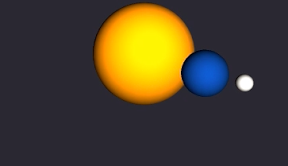

太陽の周りを地球、その周りを月がくるっとするiPhoneアプリのサンプルコードを描いてみます。
#import “ViewController.h”
@import SceneKit;
@interface ViewController ()
@property (nonatomic, weak) SCNScene *scene;
@end
@implementation ViewController
– (void)viewDidLoad {
[super viewDidLoad];
self.view.backgroundColor = [UIColor lightGrayColor];
[self setupScene];
[self createPlanets];
[self createCameraAndLight];
[self createButton];
}
– (void)setupScene {
float w = CGRectGetMaxX(self.view.bounds);
SCNView *sceneView = [[SCNView alloc] initWithFrame:CGRectMake(0, 0, w, w)];
sceneView.backgroundColor = [UIColor colorWithHue:0.7 saturation:0.2 brightness:0.2 alpha:1];
sceneView.scene = [SCNScene scene];
[self.view addSubview:sceneView];
self.scene = sceneView.scene;
}
– (void)createPlanets {
SCNSphere *sun = [SCNSphere sphereWithRadius:10];
sun.firstMaterial.diffuse.contents = [UIColor colorWithHue:0.01 saturation:0.9 brightness:1 alpha:1];
sun.firstMaterial.reflective.contents = [UIColor yellowColor];
SCNNode *sunNode = [SCNNode nodeWithGeometry:sun];
sunNode.name = @”sun”;
[self.scene.rootNode addChildNode:sunNode];
SCNSphere *earth = [SCNSphere sphereWithRadius:3];
earth.firstMaterial.diffuse.contents = [UIColor colorWithHue:0.6 saturation:0.9 brightness:1 alpha:1];
SCNNode *earthNode = [SCNNode nodeWithGeometry:earth];
earthNode.name = @”earth”;
earthNode.position = SCNVector3Make(0, 0, 20);
[sunNode addChildNode:earthNode];
SCNSphere *moon = [SCNSphere sphereWithRadius:1];
moon.firstMaterial.diffuse.contents = [UIColor colorWithHue:0.13 saturation:0.1 brightness:1 alpha:1];
moon.firstMaterial.reflective.contents = [UIColor whiteColor];
SCNNode *moonNode = [SCNNode nodeWithGeometry:moon];
moonNode.name = @”moon”;
moonNode.position = SCNVector3Make(0, 0, 5);
[earthNode addChildNode:moonNode];
}
– (void)createCameraAndLight {
SCNNode *camera = [SCNNode node];
camera.camera = [SCNCamera camera];
camera.position = SCNVector3Make(-5, 10, 50);
[self.scene.rootNode addChildNode:camera];
camera.constraints = @[[SCNLookAtConstraint lookAtConstraintWithTarget:[self.scene.rootNode childNodeWithName:@”sun” recursively:NO]]];
SCNLight *light = [SCNLight light];
light.type = SCNLightTypeSpot;
SCNNode *lightNode = [SCNNode node];
lightNode.light = light;
lightNode.position = SCNVector3Make(0, 10, 80);
[self.scene.rootNode addChildNode:lightNode];
}
– (void)createButton {
UIButton *btn = [UIButton buttonWithType:UIButtonTypeSystem];
[btn setTitle:@”START” forState:UIControlStateNormal];
btn.titleLabel.font = [UIFont systemFontOfSize:50];
[btn sizeToFit];
btn.center = CGPointMake(CGRectGetMidX(self.view.bounds), CGRectGetMidY(self.view.bounds) + 80);
[self.view addSubview:btn];
[btn addTarget:self action:@selector(start) forControlEvents:UIControlEventTouchUpInside];
}
– (void)start {
// rotate earth
SCNNode *sun = [self.scene.rootNode childNodeWithName:@”sun” recursively:NO];
CABasicAnimation *rotateS = [CABasicAnimation animationWithKeyPath:@”rotation”];
rotateS.toValue = [NSValue valueWithSCNVector4:SCNVector4Make(-0.2, 1, 0, 2.0 * M_PI)];
rotateS.repeatCount = HUGE_VAL;
rotateS.duration = 5.0;
[sun addAnimation:rotateS forKey:nil];
// rotate moon
SCNNode *earth = [sun childNodeWithName:@”earth” recursively:NO];
CABasicAnimation *rotate = [CABasicAnimation animationWithKeyPath:@”rotation”];
rotate.toValue = [NSValue valueWithSCNVector4:SCNVector4Make(0.2, 1, 0, 2.0 * M_PI)];
rotate.repeatCount = HUGE_VAL;
rotate.duration = 3.0;
[earth addAnimation:rotate forKey:nil];
}
@end