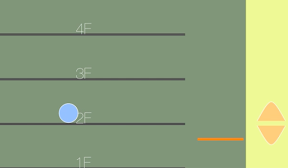

エレベーターをつかってボールを上の階に持っていくiPhoneアプリのサンプルコードを描いてみます。
import UIKit
import SpriteKit
class ViewController: UIViewController, SKSceneDelegate {
weak var scene : SKScene?
var ballDirection = –1
override func viewDidAppear(animated: Bool) {
super.viewDidAppear(animated);
self.setupScene()
self.createFloor()
self.createBall()
self.createButton()
}
func setupScene() {
let sv = SKView(frame: self.view.bounds);
let scene = SKScene(size: sv.frame.size);
scene.backgroundColor = UIColor(hue: 0.2, saturation: 0.4, brightness: 1, alpha: 1);
scene.delegate = self;
sv.presentScene(scene);
self.view.addSubview(sv);
self.scene = scene
}
func createFloor() {
let box = SKSpriteNode(color: UIColor(hue: 0.3, saturation: 0.2, brightness: 0.6, alpha: 1), size: CGSize(width: CGRectGetMaxX(self.view.bounds) * 0.8, height: CGRectGetMaxY(self.view.bounds)))
box.position = CGPointMake(box.size.width * 0.5, box.size.height * 0.5);
self.scene?.addChild(box);
box.physicsBody = SKPhysicsBody(edgeLoopFromRect: CGRect(x: –box.size.width*0.5, y: –box.size.height * 0.5, width: box.size.width, height: box.size.height))
for i in 0…3 {
let fl = SKSpriteNode(color: UIColor.darkGrayColor(), size: CGSize(width: box.size.width * 0.8, height: 5))
fl.position = CGPoint(x: fl.size.width * 0.45, y: box.size.height * 0.25 * CGFloat(i))
self.scene?.addChild(fl)
fl.physicsBody = SKPhysicsBody(rectangleOfSize: fl.size)
fl.physicsBody?.dynamic = false
let l = SKLabelNode(text: “\(i+1)F”)
fl.addChild(l)
}
let lift = SKSpriteNode(color: UIColor.orangeColor(), size: CGSize(width: box.size.width * 0.18, height: 5))
lift.name = “lift”
lift.position = CGPoint(x: box.size.width * 0.9, y: 2)
self.scene?.addChild(lift)
lift.physicsBody = SKPhysicsBody(rectangleOfSize: lift.size)
lift.physicsBody?.dynamic = false
}
func createBall() {
let ball = SKShapeNode(circleOfRadius: 20)
ball.name = “ball”
ball.fillColor = UIColor(hue: 0.6, saturation: 0.4, brightness: 1, alpha: 1)
ball.position = CGPoint(x: CGRectGetMaxX(self.view.bounds) * 0.75, y: CGRectGetMaxY(self.view.bounds) * 0.9)
self.scene?.addChild(ball)
ball.physicsBody = SKPhysicsBody(circleOfRadius: 20)
}
func update(currentTime: NSTimeInterval, forScene scene: SKScene) {
let ball = self.scene?.childNodeWithName(“ball”)
if (ball?.position.x > CGRectGetMaxX(self.view.bounds) * 0.75) {
self.ballDirection = –1;
} else if (ball?.position.x < ball?.frame.size.width) {
self.ballDirection = 1;
}
ball?.physicsBody?.velocity = CGVector(dx: CGFloat(self.ballDirection) * 80.0, dy: ball!.physicsBody!.velocity.dy)
}
func createButton() {
var points : [CGPoint] = [CGPoint(x: –30, y: –20), CGPoint(x: 0, y: 20), CGPoint(x: 30, y: –20)];
for i in 0..<2 {
let btn = SKShapeNode(splinePoints: &points, count: 3)
btn.position = CGPoint(x: CGRectGetMaxX(self.view.bounds) – 80, y: 120);
btn.fillColor = UIColor(hue: 0.1, saturation: 0.5, brightness: 1, alpha: 1)
self.scene?.addChild(btn)
if i == 0 {
btn.name = “up”
} else {
btn.name = “down”
btn.position = CGPoint(x: btn.position.x, y: btn.position.y – 50.0)
btn.zRotation = CGFloat(M_PI)
}
}
}
override func touchesBegan(touches: NSSet, withEvent event: UIEvent) {
let p = touches.anyObject()!.locationInNode(self.scene)
let lift = self.scene?.childNodeWithName(“lift”)
let oneFloor = CGRectGetMaxY(self.view.bounds) * 0.25
if let hit = self.scene?.nodeAtPoint(p) {
if hit.name == “up” {
lift!.runAction(SKAction.moveByX(0, y:oneFloor, duration: 1.0))
} else if hit.name == “down” {
lift!.runAction(SKAction.moveByX(0, y:–oneFloor, duration: 1.0))
}
}
}
}